
What's New & Troublshooting ?
Tracking bank transactions requires constant attention and often consumes valuable time for businesses. Odoo V19 introduces new improvements to bank synchronization, making the process smoother, more secure, and easier to manage daily.
In this article, we explain these new features and how to solve the most common problems.

What is Bank Synchronization in Odoo ?
There are three options to integrate your bank transactions into Odoo: manually creating a transaction, importing a file, or enabling bank synchronization.
Bank synchronization is a feature that allows you to directly connect your bank accounts to your Odoo database. It automates the import of transactions, reduces errors associated with manual entries, and simplifies the reconciliation process.
Currently, this feature is compatible with over 26,000 banks worldwide. If your bank is not on the list, feel free to contact Odoo support to discuss further.
How does the connection between Odoo and banks work ?
Bank synchronization in Odoo relies on a series of secure steps. Your database is connected to the Odoo Finance Proxy (Odoo Fin). To establish the connection with your bank, Odoo Fin uses providers such as Plaid, Ponto, Yodlee, Enable Banking, or SaltEdge, depending on your location. Once the connection is established, your bank sends the information directly to your Odoo database, facilitating the import and processing of transactions.
What's New in V19
Odoo Version 19 introduces several major improvements to make bank management easier and optimize your daily financial processes. Here are the main new features:
- Quick Transaction Details: A "Discuss" button now allows you to view transaction details, such as amount, partner, or label changes, directly from the transaction interface.
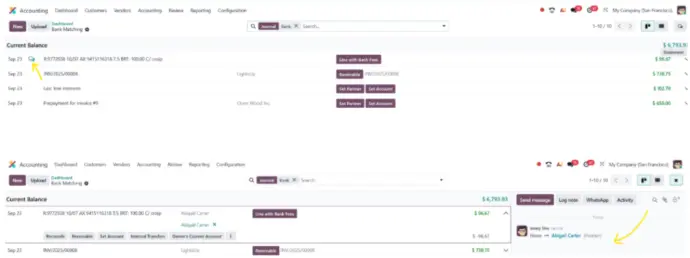
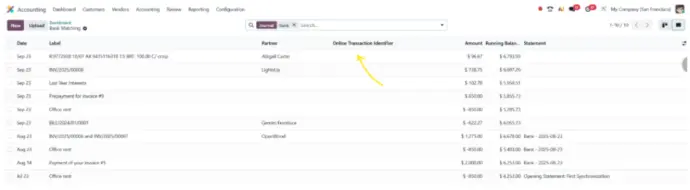
- Online Transaction ID: Each transaction from online synchronization now receives a unique ID. If you manually create a transaction, this field remains empty.
- Missing Transaction Detection: You can identify and import missing transactions.

- Duplicate Identification: A new tool groups duplicates in blocks, making it easier to delete them.

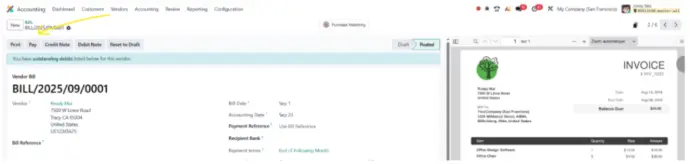
- Payments Initiated Directly from Odoo: You can now make payments from Odoo (currently available with Ponto only). To use this feature, simply activate the "SEPA credit transfer" option, click "Pay" from the supplier invoice, and follow the security steps provided by Ponto. Once the payment is made and accepted, the invoice status in Odoo will be automatically updated.
Best Troubleshooting Practices
If synchronization issues occur, here are some solutions to resolve them quickly :
🔄 Expired Connection ?
This is a simple security step. Just click “Update Credentials” to renew the connection authorization to your bank.
📊 Multiple Connections to the Same Bank Account ?
If you connect to the same bank account from multiple databases (test, backup, etc.), it can cause issues. In this case, go to the online sync list and delete the extra entry. Then, reconnect your bank from your dashboard.
💡 Missing or Too Old Transactions ?
Most banks allow you to retrieve up to about 3 months of transaction history, sometimes 6 months. This varies by bank, so older transactions might not be visible.
⏳ Pending Transactions ?
Some transactions may take longer to process, especially at the end of the week, as some banks only validate during working days.
🔒 Bank or Provider Issue ?
If the issue is external to Odoo (on the bank or connection provider side), Odoo support is your single point of contact.
Conclusion
With Odoo V19, bank synchronization becomes more robust, transparent, and integrated. From handling duplicates and importing missing transactions to initiating SEPA payments directly from Odoo, you save time and improve efficiency.
And if a problem arises? Most issues can be solved with just a few clicks using the integrated troubleshooting tools. For the rest, Odoo support is there to assist you.
Prêt à passer sur Odoo pour optimiser votre gestion bancaire ? Nalios, votre intégrateur Odoo Gold, configure et paramètre votre synchronisation bancaire selon votre infrastructure et vos banques partenaires.
Learn more about the authors of the article

Anouck Lambert
Business Analyst
Anouck has been working at Nalios Wallonie for almost three years. As a Business Analyst, she leads end-to-end Odoo implementations and advises teams on best email practices to ensure reliable communications.

Eliot Jacquet
Business Analyst
Eliot has been working at Nalios Wallonie for 6 months. As a Business Analyst, he advises and assists companies with their Odoo implementation projects. His goal is to challenge them as much as possible to arrive at the most suitable Odoo solution for their needs.