Your ERP for service companies on-site service
Plan, intervene, invoice. One system from the office to the field, no matter your profession.
Talk to our experts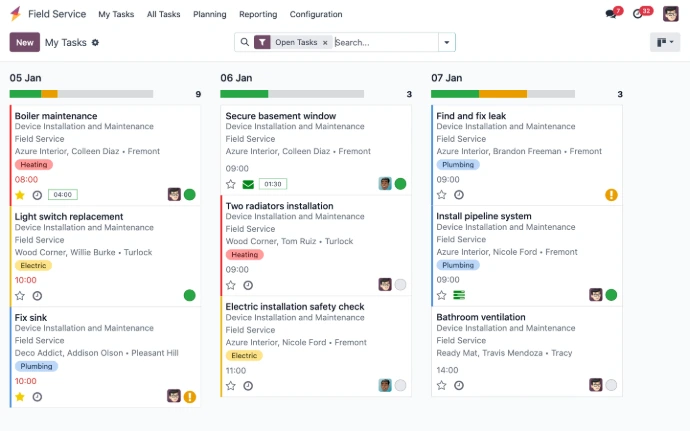

Structure your on-site service company See more
The invisible cost of double entry
An intervention report filled out in the evening from memory. Hours reported on Friday for the entire week. An invoice issued three weeks after the intervention because the installed parts had to be found. Each of these delays is individually acceptable, and together they determine your cash flow.
The question is not to digitize for the sake of digitizing. It is to ensure that the information entered once in the field is never retyped again.
The useful Odoo modules for your on-site service company
Odoo offers a suite of modules designed to cover the essential needs of on-site service companies. Among the most used, we find the Planning to structure operations, the Inventory to manage stock in one click and the module Invoicing to ensure you recover the fruits of your labor.

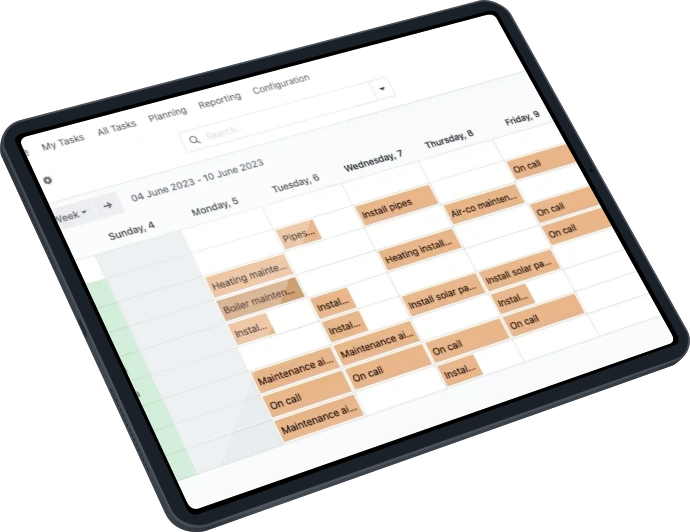
Plan and dispatch your interventions
This application allows you to manage and schedule the hours of technicians and other stakeholders.
It helps organize missions based on availability and urgency, ensuring that resources are optimized and commitments are met.

Manage your stocks, from the warehouse to the truck
The inventory is essential for tracking the equipment and materials needed for on-site interventions.
This application allows you to manage stocks, monitor inventory levels in real-time, and ensure that all necessary materials are available for technicians at the time of their intervention.

From clocked hours to invoice
The hours and parts reported from the field directly feed into the invoice. The time between intervention and billing is counted in days, not weeks.
The Billing application simplifies the payment process and improves cash flow.
The mobile application for on-site service in Odoo
What your technicians do from their phone
View the day's route, open the site sheet and history, start and stop the timer, take photos, record the parts installed, write the report, have the client sign on the screen. All in one application, without going back to the office.
The five indicators that an operations manager looks at
When choosing an ERP system for your business, it is essential that it meets your specific needs. For the on-site service sector, it is important that your ERP has these 5 indicators :
Odoo or a dedicated on-site service management software?
We regularly compare Praxedo, Synchroteam, and Organilog during the selection phase. Here’s how we compare them with Odoo :
| Dedicated field service software | Odoo with an integrator |
|
|---|---|---|
Covered scope |
The interventions |
Interventions, plus sales, purchases, stock, accounting and payroll |
Startup time |
A few weeks |
A few weeks |
Mobile field application |
Mature, often the strong point |
Complete management, even outside the office |
Client portal and appointment scheduling |
According to the publisher |
Included |
Link with your accounting |
Export or connector to maintain |
Same database, no transfer |
When you add an activity |
New tool or new license |
A module to activate, at no additional cost |
Data ownership |
Publisher's cloud |
Open source, exportable, reversible base |
The most complete, flexible, and accessible ERP on the market.
A dedicated tool deploys faster and will save you time on your interventions. But it will only solve part of the problem: your quotes, purchases, stock, and invoicing will continue to exist alongside, with the re-entries and discrepancies that this implies. Odoo requires a bit more ambition at the start but gives you a single system that follows your growth, no matter what business you add tomorrow.
The sectors that trust us trust
Optimize the management of your inventory and production thanks to the ERP software Odoo. Easily track stock levels, perform automatic replenishments, and generate production orders with a single click.



Don't just upgrade your ERP, upgrade your way of working
We start with an analysis of your current system, then our team supports you at every step:
Configuration of the solution and training of users
Go live, returns and stabilization.
Take advantage of new capabilities of Odoo while minimizing the risks of interruption or data loss. The duration depends on your Odoo environment (SaaS or On-Premise).
We also ensure you a training on the new features, so that your teams are ready to fully leverage their new system.
Want to learn more? Contact our experts!

Frequently Asked Questions.
Here are some frequently asked questions about Odoo and the site service companies:
These are three complementary applications. Planning manages the schedules and assignments of your teams. Onsite Services manages the intervention itself, from the work order to the signed report. Project manages long projects broken down into tasks. A field service company typically uses the first two, and the third if it also does installations.
Yes. The intervention report is signed directly on the screen at the end of the visit, and the client receives their copy by email immediately. This also triggers the billing.
Yes, via the API. That said, in the majority of cases we see, maintaining two systems and their connector costs more over three years than switching the relevant scope to Odoo. We systematically ask about the cost of the interface before building it.