Odoo project management, from the signed quote to the actual margin
Most service companies know if the year has been good. Much fewer know which projects actually made money, and why the others went off track.
Talk to our experts From quote to project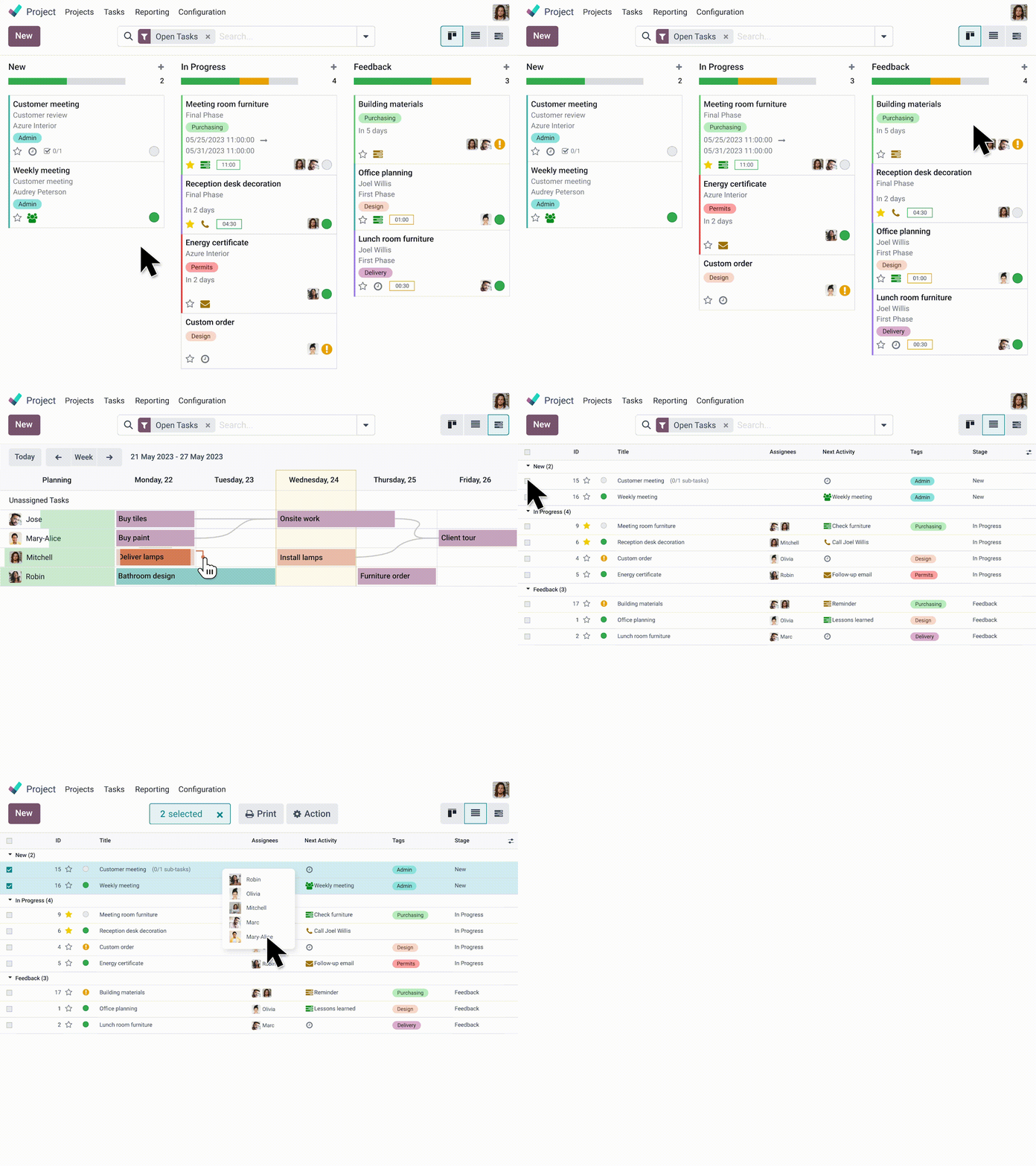
What changes from one company to another is not the tool, it's what triggers the invoice. We support three ways of working in project mode.
1
Billing by time spent
Every hour logged becomes a line on the invoice, and every hour not logged becomes a lost opportunity. The issue is the actual logging rate of your teams, not the precision of your planning.
2
Fixed-price projects
The price is set, so the margin is only based on the time consumed. The challenge is to see the drift during the project, when it is still possible to act, and not at the final invoice.
3
Internal projects
Nothing is billed, but everything is consumed. The challenge is to arbitrate between the projects competing for the same people, knowing what each actually costs.
Why a project management tool does not take
Five causes on the ground, and none is a lack of functionality :
From the signed quote to the project, without re-entry
This is the starting point, and this is what differentiates an ERP from a task management tool.
A signed order creates the project, with its tasks, its sales budget, and the hours sold by service. The project manager copies nothing, and above all he works on the scope actually sold, not on what he thinks has been sold. Recurring projects start from templates, which avoids rebuilding the same structure for each case.
The upstream of the flow, the qualification and the quote, is handled on our page CRM and sales.


Timesheets, where everything happens
Without correctly entered time, nothing that follows works. Neither profitability, nor billing for time spent, nor the forecast load.
Odoo offers entry on computer, mobile, and stopwatch, with validation by the manager. Technically, this has been set for a long time. The issue lies elsewhere: it is an adoption issue.
What we systematically apply: entry should take less than a minute per day per person, it should be done daily and never at the end of the month, and above all it must bring something to the person entering it. A consultant who sees their workload for the week and their occupancy rate enters. A consultant who feeds a dashboard they will never see stops after three weeks.
The corollary: do not ask for more detail than you will exploit. An entry for half a day that is actually kept is better than an entry for a quarter of an hour that is abandoned.
Profitability by project, in real time
Odoo aggregates on one side the costs of a project, namely the time spent valued at the cost of your teams, the allocated purchases, the expense reports, and subcontracting. On the other side, the revenues, whether they come from a flat rate, from time spent re-invoiced, or from milestones reached. The difference is your margin, project by project, available along the way and not three months after the final invoice.
Two prerequisites that we always frame upstream, because they determine the reliability of everything else. First, the hourly rate retained by profile: employer cost only, or employer cost increased by a share of overhead. Both are justifiable, but this choice changes your margins from simple to double and must be decided with your financial management. Then what is allocated to a project and what remains in general expenses, particularly pre-sales and internal meetings.
A point on milestones, often overlooked: they serve as much to trigger billing as to spot deviations. A milestone exceeded by three weeks on a three-month project is immediately visible, whereas the same deviation drowned in a percentage of progress is never seen.

Billing at a fixed price, by time spent, or by milestones
Odoo covers all three models, and especially their combination on the same project, which corresponds to the reality of most service companies: a fixed price for framing, then days billed by time spent, plus a portion of re-invoiced expenses.
The subject not to be rushed is expenses and disbursements. The expense reports attached to the project can be automatically re-invoiced, with or without margin, or absorbed. Decided at the start, it's three clicks. Decided after six months, it's a historical recovery.
The accounting aspect, entries and analytics, is detailed on our page accounting.

Plan the workload of your teams
Know who is doing what next week, and if you can accept the project that has just been proposed to you.
Odoo allows you to assign tasks, visualize team schedules, and take into account leave in the available workload. However, be careful: resource planning falls under a separate application from project management. This is a detail that impacts your scope and your license budget, and it's better to learn it here than during the quote.
Our advice: start with the two-week workload, which is the one your managers actually arbitrate. The six-month forecast is a management exercise, it comes later, and it is only valid if the timesheets are maintained.
Involve the client without opening your back office to them
Your clients want to know the status of their project without having to send an email every Tuesday.
The client portal allows you to share what you choose to share: progress, certain documents, validated milestones, and to collect validation or a signature. Each project has its own document space, which avoids the lost attachment in a conversation.
What matters in the configuration: deciding what the client sees and what they do not see. An overly open portal turns every internal discrepancy into a business discussion.

You already have Odoo Project and no one is using it
The most common case, and the most commercially mature segment.
What we almost always find: projects created manually without links to orders, timesheets entered by a third party from the team, pipeline stages inherited from a template that no one has adapted, and a budget tracking spreadsheet that remains the true reference for the project manager.
Our assessment focuses on three points: the actual time entry rate, the gap between billed projects and projects tracked in the tool, and the reliability of the hourly cost used. The rest follows from this. Restoring project tracking to a proper state almost always costs less than changing tools.
Who is project management in Ooo aimed at?
What changes from one profession to another is not the tool, but the way the project is sold and what triggers the invoice. Here are the profiles we most often support.
→ I discover

Frequently Asked Questions
Here are some frequently asked questions about project management in Odoo:
On task management and progress tracking, yes, and with a decisive advantage: the project is linked to the quote, timesheets, and the invoice, which no task tool does. For heavy planning with critical path and earned value, a specialized tool remains more relevant.
Yes, and this is even the most common case: a framing flat rate, days billed by time spent, and reimbursable expenses. The rule for reimbursing expenses is decided at the start.
Yes, on mobile and with a stopwatch, with validation by the manager. The difficulty is never technical: it is to make the entry fast enough and useful enough so that it is done every day.
Yes, provided that two things have been decided at the start: the hourly rate retained by profile and what is allocated to the project rather than to overhead costs. These two decisions determine the reliability of all your margins.
Yes, via a portal where you precisely choose what is shared: progress, documents, milestones, validation, or signature. The configuration mainly consists of deciding what the client does not see.
Yes, with a Gantt chart that displays them and allows for task reorganization. However, Odoo does not calculate a critical path and does not automatically recalculate the entire schedule when a task slips.
Our consultants are experts in Odoo Project management
Does project management on Odoo meet your needs? Request a free demo via the form below and we will find the optimal solution to help you.
Want to know more ?
Contact our experts !