
The new AI features in Odoo Document
Document management often causes companies to lose valuable time: too many clicks, too many manual checks, and a constant risk of errors.
Thanks to the new AI integrated into Odoo’s Documents application, this process becomes faster, smarter, and more reliable, as long as you provide the right prompts. The result: significant time savings while maintaining control over your sensitive information.
And if you'd like to take the automation of your document workflows a step further, the teams at Nalios, an Odoo integration company, can help you configure these rules to align with your business processes.

An intelligent and collaborative document space
Odoo’s Documents application acts as a true collaborative workspace to centralize and organize your files. You will find :
- A personal drive for your own documents.
- Shared folders with specific collaborators.
- The company drive.
You can add files to the application in several ways: by uploading them directly, by simple drag-and-drop, or by sending an attachment to the dedicated email alias.
Then, Odoo AI takes care of the rest. Thanks to your prompts (your instructions), the documents :
- can be recognized (for example: if the client name on the document is my company, it is a vendor bill, otherwise it is treated as a customer invoice).
- can be sorted (for example: they can be sent to specific folders).
- can be associated with tags (for example: if a document contains several invoices, Odoo automatically adds the tag “to split”).
- can go through a validation step (for example: any invoice over 5,000 euros triggers an approval activity assigned to a specific user).
- can even generate records (for example: creation of invoices).
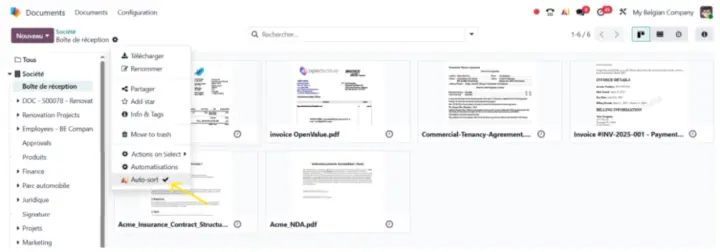
Please note that AI can run at the frequency of your choice, or following a manual trigger via the “Auto-sort” action.
Best practices for writing effective prompts
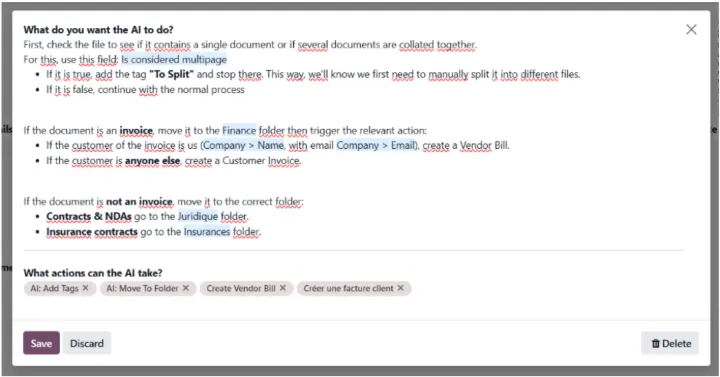
A) To make the most of Odoo Documents AI, it is essential to structure your prompts clearly and hierarchically. For example:
- If the document is an invoice, classify it in the Finance folder;
- If it is a contract or a legal document, send it to the Legal folder.
This organization ensures that each file type automatically finds its place. You can also add subpoints if necessary.
B) Add dynamic fields or records in the prompt (via ‘/’) to retrieve information from the database.
C) Add actions to be performed by the AI in the section ‘What actions can the AI take’ (e.g.: create a vendor bill, add a tag, create an activity, ...). If the action does not exist, you can create one (type the action name and click on ‘Create and edit’).
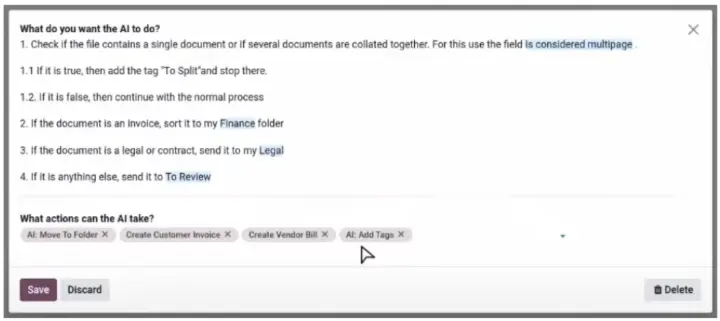
D) Another best practice: plan a “safety net” by directing unrecognized documents to a control folder (to review). For example: 3 → if it is none of the above, place it in the “To check” folder. This way, you keep control of the business logic while minimizing human intervention.
E) Finally, for smooth management, consider adding specific prompts for special cases such as detecting files containing multiple documents, or triggering a manual validation, for example, for invoices above a certain amount.
Examples of prompts
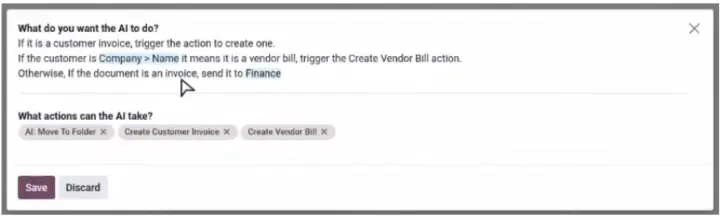
For more inspiration, here are some prompt examples:
Learn more about the authors of the article :

Anouck Lambert
Business Analyst
Anouck has been working at Nalios Wallonia for almost three years. As a Business Analyst, she leads end-to-end Odoo implementations and advises teams on email best practices to ensure reliable communication.

Clémence de Wouters
Business Analyst
Clémence joined Nalios Switzerland in September 2024. As a Business Analyst, she supports her clients in the implementation of Odoo. What she enjoys most about her job is problem-solving and direct client contact — helping them optimize their daily management and save time through efficient solutions.