
What’s New in the POS Restaurant ?
Odoo 19 transforms the restaurateur's experience by offering a unified platform that integrates reservation management, orders, kitchen, and customer service. Here’s an overview of the main new features of the POS Restaurant module.
.

1. Enhanced Reservation Management
- Integration with Google Reservation: Customers can book directly via Google, automatically syncing reservations in Odoo.
- Kanban View of Reservations: View reservations by status (confirmed, pending, arrived) with customizable filters.
- Display of Allergies and Number of People: Each reservation shows the customers' allergies and the number of guests, facilitating kitchen preparation.
- Gantt View: Schedule reservations and services on a timeline for optimal flow management.
2. Customization of Customer Service
Consumption Modes: Choose between "dine-in", "takeaway", or "delivery". Taxes and prices automatically adjust based on the selected mode.
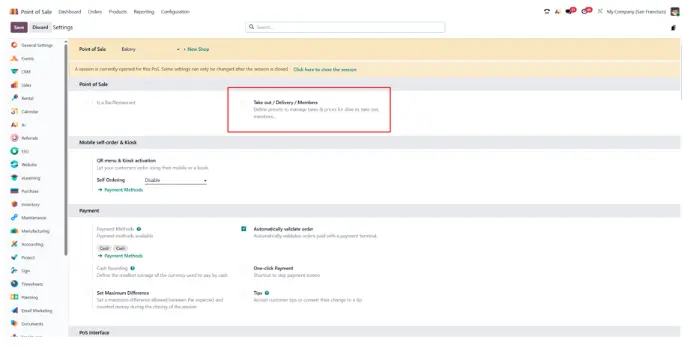
QR Codes for Mobile Menus: Customers can scan a QR code at their table to access the menu, place an order, and pay via their smartphone.*
3. Kitchen and Order Display
Kitchen Display System (KDS): Orders are sent in real-time to the kitchen, with statuses such as "to prepare", "ready", and "served
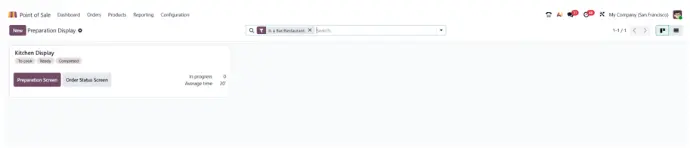
Display of Allergies and Courses: Allergy information and courses (starter, main dish, dessert) are visible for each order.
Flexible Combos: Create combo menus with customizable options, offering an enriched customer experience.*
4. Order and Payment Management
- Organizing Orders by Course: Orders are grouped by dish type, facilitating kitchen and service management.
- Reorganization of POS Products: Sort products by favorites and customize their display order for quick access.
- Order Sharing: Easily split orders between multiple customers for individual billing.
- Artificial Intelligence: Odoo 19 integrates AI features to automate certain tasks, such as product suggestions or analyzing consumption trends.
5. Interface and User Experience
- New Kiosk Design: The kiosk interface has been modernized for smooth and intuitive navigation.
- Dark Mode: A dark mode is now available to reduce eye strain during long service hours.
6. Allergen Management
Allergen Configuration: Associate allergens with each product in the setup, enabling clear display for sensitive customers.
7. Integrations and Automation
- Process Automation: Use AI-powered server actions to automate complex workflows with natural language commands.
- Integration with Other Odoo Modules: Synchronize reservation data with the Agenda module, manage inventory with the Inventory module, and track financial performance with the Accounting module.
8. Reporting and Analytics
- Status-Based Reports: Generate detailed reports on reservation performance, sales by service type, and order trends.
- Allergy Tracking: Analyze the frequency of reported allergies to adapt menus and improve food safety.
Pour déployer ces fonctionnalités dans votre établissement, Nalios vous accompagne en tant que spécialiste en intégration Odoo, avec une compétence reconnue dans les environnements point de vente et restauration.
Learn more about the author of the article:

Matthieu Aussems
Business Analyst
Matthieu Aussems has been working at Nalios Wallonie for just over two years. As a Business Analyst, he supports his clients in the implementation of Odoo and works on projects in inventory management and manufacturing to optimize processes and ensure efficient management.*
Commencez à écrire ici ...