
Add a field, move a button, edit a view: with Odoo Studio, everything seems possible in a few clicks. That is exactly where the trap lies. Every customization is a potential debt, paid for in daily errors or hours lost at upgrade time.
At Odoo Experience 2026, the talk "Odoo Studio: Best practices for customization made easy" put forward a simple idea: using Studio well starts with knowing when not to use it. Augustin Mailleux, Business Analyst at Nalios, attended the session. Here are the Odoo Studio best practices to apply, whether you are an Odoo administrator or manage a deployment project.
01Three rules before you open Odoo Studio
The first rule is to customize as little as possible. Many needs are already covered by standard features, if you take the time to look. Odoo maintains a standard feature in every version; a customization is maintained by you.
The second is to reserve Studio for power users and implementers. Opening access to everyone means accepting randomly added fields and a database that becomes harder and harder to maintain. The third is to always work on a test database first: fixing a failed customization in production takes far more time than getting it right the first time.
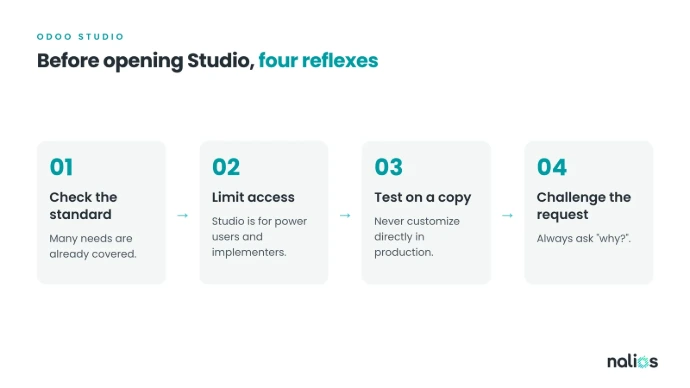
The basic rules presented in the Studio talk at Odoo Experience 2026
Above these three rules sits one that sums them all up: challenge every request. Whether it comes from a customer, a colleague or yourself, a request presented as essential always deserves the question "why?".
02Say no, say yes, or suggest something better
Not all Odoo customization requests are equal. The talk sorted them into three families.
1 · Habit-driven requests
Some requests are about comfort, such as getting back the color of a button from the old ERP. They take work for a benefit forgotten after a few weeks. The right answer is training, not customization.
2 · Legitimate, trivial requests
Other requests are justified and easy to satisfy. In Odoo 20, rearranging buttons in a view is a simple drag and drop. No need to turn it into a project.
3 · Requests already covered by standard features
Many requests already have an answer in Odoo. A field for internal notes duplicates the chatter. A dedicated export button adds nothing when you can simply select the lines and export in two clicks.
A lightly customized but well-designed database is one that sails through upgrades.
03Creating a field in Studio with the long term in mind
When a new field is truly needed, its type and location matter more than anything. Take a customer payment status. A selection field on the invoice meets the immediate need, but its values are fixed and it must be filled in on every invoice.
A many2one field created on the contact, then brought up to the invoice through a related field, is both extensible and filled in only once. You get a list of values you can expand without any new customization, and a single source of truth.
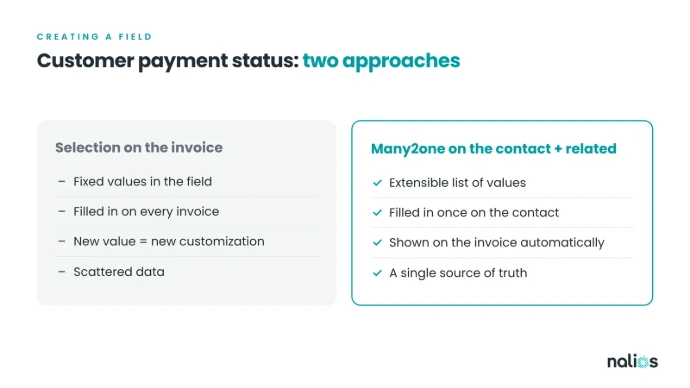
The field type and its location matter more than anything
A few hygiene habits prevent a lot of confusion later on:
- Rename the field as soon as you create it: its technical name stays readable instead of a random string generated by Studio.
- Add the suffix _id to many2one fields: the Odoo convention makes the database understandable to any developer.
- Mark obsolete fields: for example with "(old)", so nobody reuses them by mistake.
- Know that a removed field is not deleted: removing a field from a view leaves it in the other views and in the database.
04The Studio side panel, the most underrated tool
A good share of needs can be handled without creating anything, from Studio's left-hand panel. It is simple, fast and has no impact on upgrades.
- Conditional visibility: a field displayed only on customer invoices, for example.
- Group restriction: a field visible only to certain users.
- Columns hidden by default: a more readable list view for everyone.
- Aggregates: display an average rather than a total in a column.
05Work around it rather than code it
When a request seems to require a computed field, and therefore Python, there is often an alternative. To get a "paid amount" (total minus amount due) and tailor-made indicators, simply enable the pivot view and send the table to an Odoo spreadsheet.
A calculated measure does the job there, and the result can be embedded in a dashboard. The need is covered without adding a single line of code, and with nothing to migrate in the next version.
06AI: an accelerator, not a free pass
An AI assistant will happily tell you everything is doable. It saves real time, but it does not replace expertise. The talk's advice is clear: don't hand AI anything you couldn't understand or maintain yourself. A module generated without a technical foundation becomes a problem the day it crashes, or the day of the upgrade.
07Odoo Studio or development: where to draw the line?
The dividing line is fairly clear. Studio is well suited to adding fields, adjusting views, or setting up automations and approval rules. As soon as you need to change a business flow, build an entire application or stack up twenty or so new fields, a custom Odoo development is preferable. It will be more robust and easier to evolve.
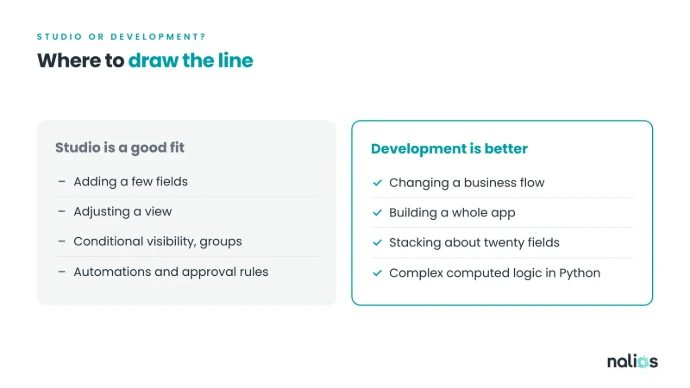
Studio to fine-tune, development to transform a process
💡 The Nalios perspective
At Nalios, we regularly see databases where Studio was opened to everyone, with no documentation. On the day of the Odoo migration, every forgotten field becomes a question to settle, and the budget follows. Our approach is to minimize custom developments: exactly the spirit of this talk.
Before your next version upgrade, take stock of your Studio customizations: what is still in use, what duplicates Odoo 20 standard features, and what deserves to be rebuilt properly. Document every change, for example in the Knowledge app.
To learn more about what changes in the latest version, read our article Odoo 20: the new features that will really make a difference. And if your teams need to learn to use Studio without breaking the database, our Odoo training courses cover these best practices.

Key takeaways
Odoo Studio best practices in four points.
An Odoo database ready for every upgrade
We audit your Studio customizations and help you keep a healthy, scalable database.
Let's talk about your projectSources: talk "Odoo Studio: Best practices for customization made easy", Odoo Experience 2026, notes by Augustin Mailleux (Nalios).
Key questions
Short answers to the most frequently asked questions about Odoo Studio.
Yes, they are kept, but each one must be checked during the version upgrade. The more modified fields and views a database has, the more testing the migration requires. That is why it pays to customize as little as possible and document every change.
Power users and implementers, not all users. Broad access leads to randomly created fields and a database that is hard to maintain.
As soon as you need to change a business flow, build a complete application or add twenty or so fields. Studio remains ideal for one-off fields, view adjustments and simple automations.
Often, yes. The pivot view sent to an Odoo spreadsheet lets you create a calculated measure and embed it in a dashboard, with no computed field in Python.