Live Auctions
Scheduled and live auctions on your website: proxy bidding, anti-sniping, Buy Now, security deposits and live shopping sessions


Présentation du module

/ Odoo 20 · Website
Live Auction
Run professional auctions directly on your Odoo website. Timed sales with proxy bidding and anti-sniping, card deposits for serious bidders, and live shopping shows — with the sale order and invoice created by Odoo, automatically.

Coverage
One module. Two ways to sell.
Classic timed auctions, live shopping shows, or both — every feature works in either mode and can be toggled globally or per auction.
See it in action
Your auction room, on your own website
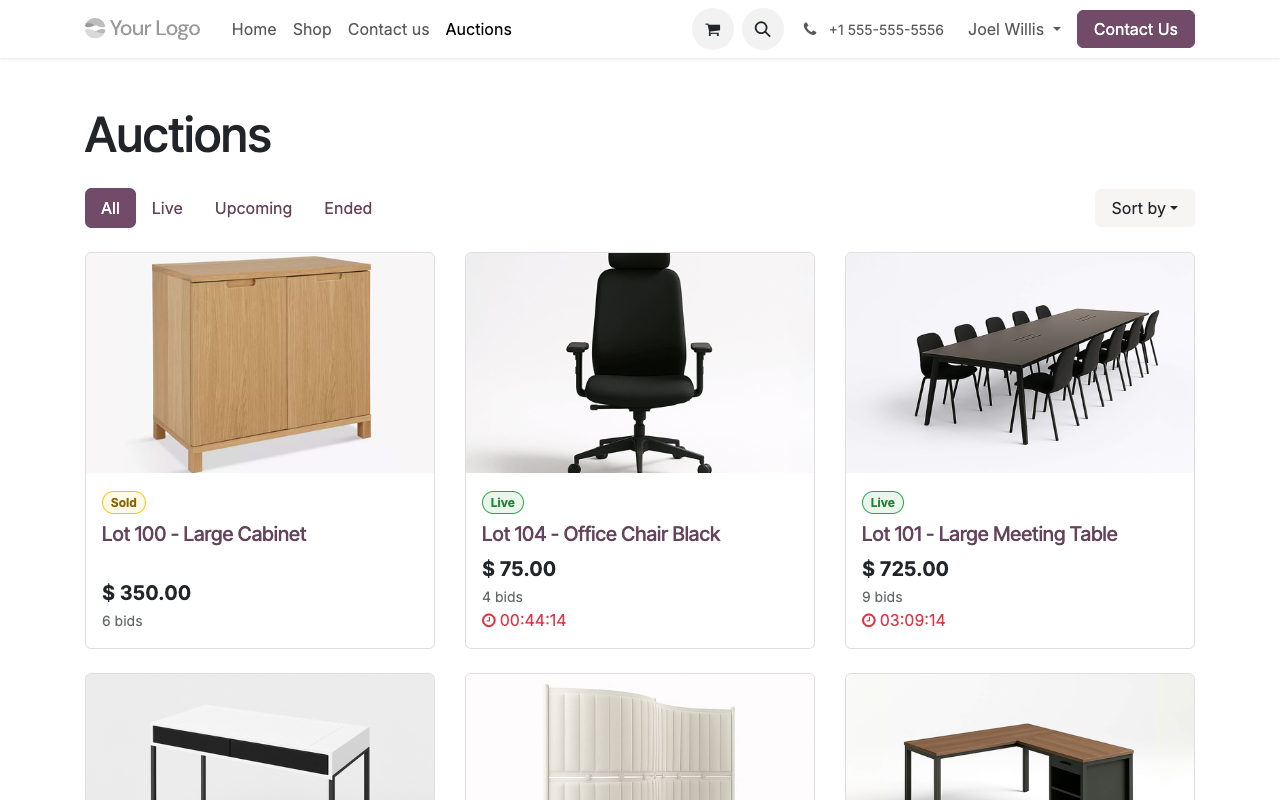
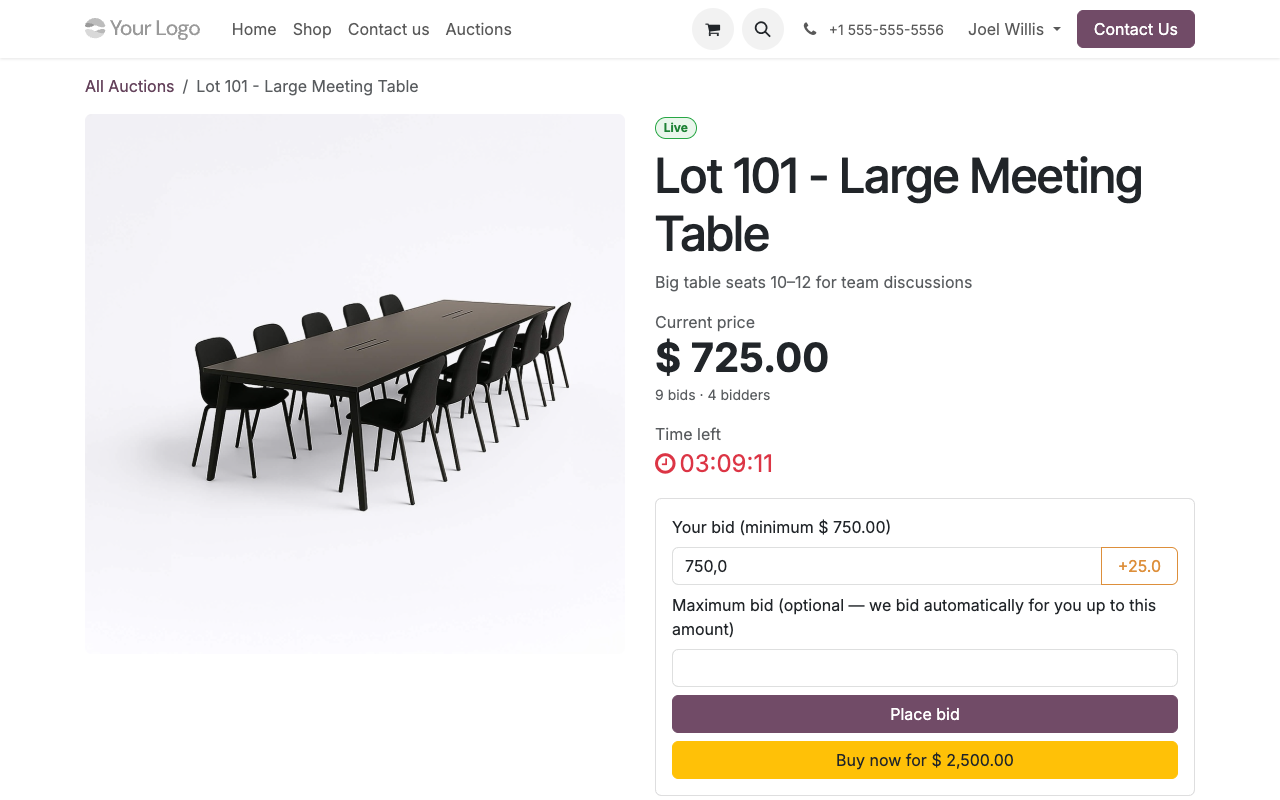
A public Auctions page with live, upcoming and ended lots, and one page per lot with the live price, countdown, bid form and anonymised history. Real screenshots, Odoo 19.
Auctions page: lots, status and countdowns
Lot page: live price, proxy bid, Buy Now and history
Back office
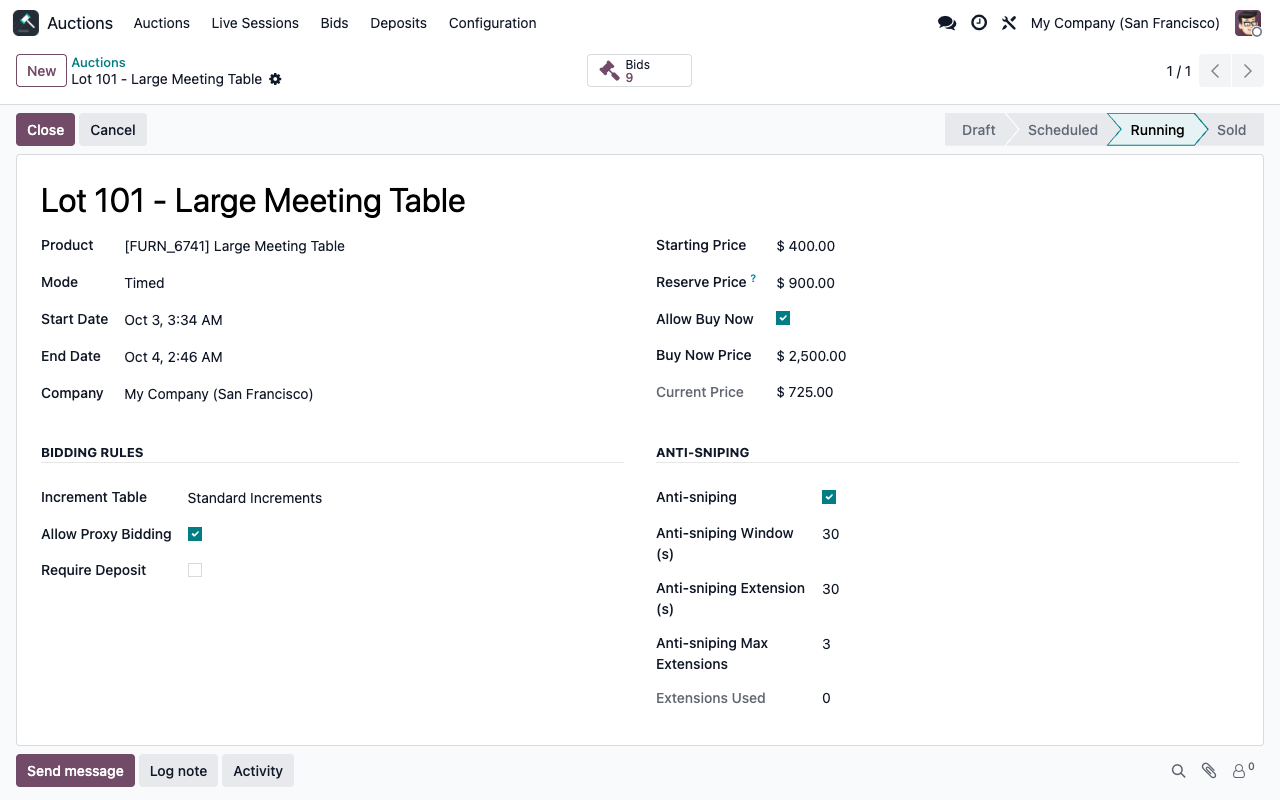
Every lot, one form
Product, schedule, starting price, hidden reserve, Buy Now, increment table, proxy bidding, deposit and anti-sniping settings — with the bids one click away and the full chatter history.
Setup
Your first auction in 5 minutes
1
Pick a preset
One click in Settings applies a coherent profile — Standard, High-stake B2B, Charity or Live Show. Every default remains adjustable, globally or per auction.
2
Create your auction
Pick the product, set the schedule, starting price, hidden reserve and optional Buy Now. The cron opens and closes it for you — nothing to babysit.
3
Let bidders compete
Visitors follow the price and countdown live on your website. When the hammer falls, the winner gets a confirmed order and invoice — automatically.
Differentiators
Why this module is different
Real time by design
Prices, bid history and countdowns update instantly for every spectator over Odoo's native WebSocket bus — no page reload, no external service to host. If the bus is unreachable, the page silently falls back to polling: bidders never see a stale price.
Race-condition-proof bidding
Every bid is validated inside a row-level database lock: two bidders can never win the same price, and proxy counter-bids resolve deterministically — equal ceilings go to whoever set theirs first. Auction-grade fairness, guaranteed by the database.
Deposits that filter serious bidders
Require a card pre-authorization — fixed amount or percentage of the starting price — before anyone can bid. At closing, the winner's deposit is captured and every other deposit is released automatically — also when the reserve is not met or the auction is cancelled. It runs on Odoo's standard payment providers with manual capture (Stripe, Adyen...).
Live shopping, on your own site
Host TikTok-style live sales without giving up your margin or your customer data. Video stream, real-time bidding and moderated chat on a single page of your website — while the seller drives the show lot by lot from a back-office cockpit.
Configurable at every level
Global defaults in Settings, one-click presets, and per-auction overrides for everything: increments, proxy bidding, anti-sniping window and extensions, deposits, Buy Now. Sell art, machinery or charity lots with the same module.
End-to-end in Odoo
The hammer price becomes a confirmed sale order in the winner's name, the invoice is posted and notifications are sent — no export, no re-encoding, full traceability of every bid with its exact timestamp.
Auction lifecycle
From first bid to invoice, automated
01
You schedule the auction; the cron opens it on time and the countdown starts on your website
02
Bidders compete in real time; proxy bidding fights for them up to their maximum, outbid emails go out
03
A last-second bid lands — anti-sniping extends the deadline so everyone gets a fair chance
04
The auction closes above the reserve: confirmed sale order and posted invoice in the winner's name
05
The winner's deposit is captured, the others are released, and won/lost notifications are sent
No re-encoding. Full traceability.
Under the hood
Technical highlights
More than an auction plugin
Most auction modules stop at the winning bid. This one closes the loop: the sale order, the invoice, the deposit capture and the customer notifications are all triggered by the same transaction that closes the auction. Payment of the hammer price and delivery then follow your usual Odoo flow.
FAQ
Good to know
How does the winner pay?
At closing, Odoo confirms a sale order and posts the invoice in the winner’s name; the “won” email tells them your team will contact them for payment and delivery. The hammer price is not charged online, and a captured deposit stays a separate payment to match with the invoice.
Do live lots close on their own?
No. Timed auctions are opened and closed by a scheduled action. In a live session the seller opens and closes each lot from the run of show.
How do bidders find a live session?
Share the /live/<id> link: there is no live sessions index page or menu entry. Live Mode must be enabled in Settings.
What is sold per lot?
One unit of one product per auction. There is no buyer’s premium. Products invoiced on delivered quantities cannot be invoiced at closing: the chatter tells you so.
A question? A problem? Talk to the people who built it.
We will get back to you within 8 business hours.
Email us directly at
Published by
Nalios — Odoo Gold Partner, Belgium — nalios.be