
A successful bank reconciliation with Odoo
Odoo revolutionizes the bank reconciliation experience with a completely redesigned, AI-powered interface. Simpler, more intuitive, and above all more collaborative, this new module turns a traditionally tedious task into a smooth, intelligent, and efficient process.
Pour paramétrer ces règles de réconciliation selon vos flux bancaires spécifiques, Nalios vous accompagne en tant que partenaire Odoo agréé en comptabilité et finance d'entreprise.
Discover the innovations that make daily accounting easier for finance professionals.
A completely redesigned reconciliation screen
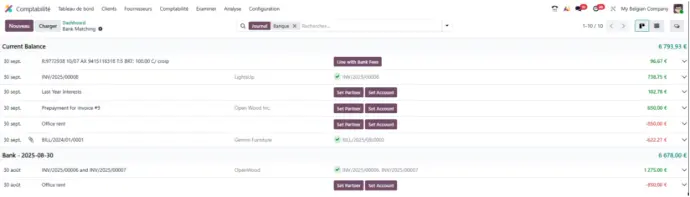
Odoo’s new bank reconciliation screen has been built to offer a cleaner, more fluid, and intuitive experience. Transactions are now presented in a clear and visual way:
- Incoming payments appear in green, for immediate recognition. Outgoing payments are displayed in red, making disbursements easy to identify.
- Each line now includes more contextual details, allowing accountants and financial managers to make faster, more accurate decisions.
Collaborate directly on your transactions
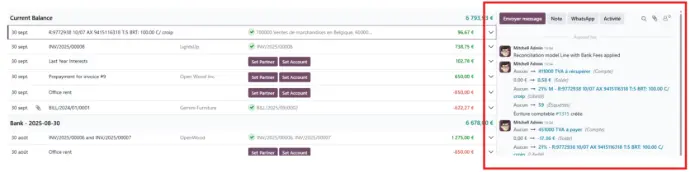
Odoo’s bank reconciliation screen now includes a chatter on each payment transaction, allowing finance teams to work more efficiently:
- Communicate in real time about a specific transaction — no need to switch tools.
- Review the full conversation history to keep a clear record of all decisions.
- Create and assign activities (follow-up, validation, reminders, etc.) directly from the transaction.
Each bank line becomes a true collaborative workspace, where information flows seamlessly and no action is missed.
A reconciliation process that learns from you
Thanks to Odoo’s built-in intelligence, bank reconciliation becomes smarter with every use.
The system learns from your previous actions and remembers your reconciliation choices.
- On the next reconciliation, Odoo automatically suggests the same logic.
- You save time by validating these smart suggestions with a single click.
- Reconciliation templates can also be generated automatically based on your actions.
Create vendor bills in one click
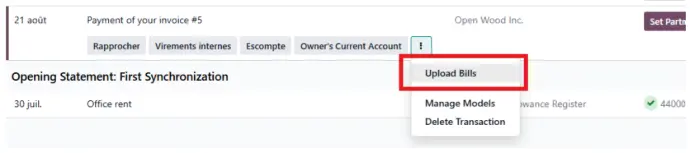
With Odoo, bank reconciliation goes beyond matching transactions. You can now upload a vendor bill directly from a bank transaction:
- Import the document during the reconciliation process.
- Odoo automatically creates the corresponding vendor bill.
- This feature saves time, avoids manual re-entry, and centralizes all supporting documents in one place.
Vendor bill management becomes faster, more reliable, and perfectly connected to your banking flows.
Learn more about the author of this article :

Axel Debève
Business Analyst
Business Analyst at Nalios France since May 2024. Always attentive and solution-oriented, Axel supports companies in understanding and optimizing their business needs with Odoo. Pragmatic and a good listener, he takes pride in analyzing business processes to deliver clear and tailored solutions. His mission: turning clients’ challenges into concrete and efficient solutions for their daily operations.