Global Search
Find any document from anywhere, matching on several fields and in the chatter.


Présentation du module

/ Odoo 20 · Productivity
Global Search
A search icon in the top bar, on every screen. Search a word in all the text and link fields of any object at once, or in the chatter of every document.
What it does
Find it from anywhere
The standard search bar only looks in the fields its search view offers. Global Search looks in all of them, and in the messages too.
All fields at once
Choose a model, type a term: Odoo searches every stored char, text, HTML and many2one field of that model, custom and Studio fields included.
See why it matched
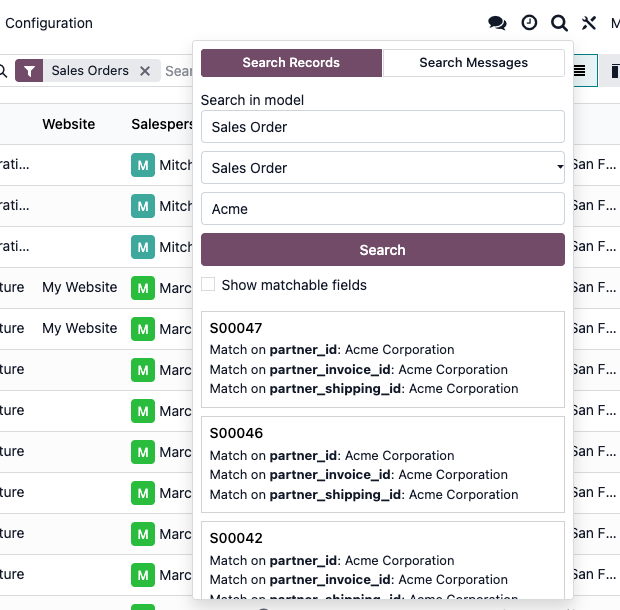
Each result lists the fields that matched with their value, for example partner_id: Acme Corporation. Click the title to open the record.
Search the chatters
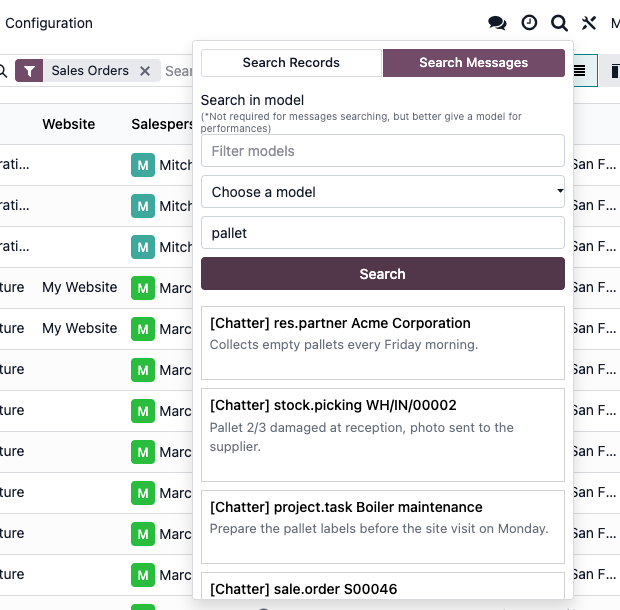
Search the subject and body of messages, notes and emails across all documents, or within one model. Each result shows the document and the message.
Choose the fields
Tick Show matchable fields after a first search to pick the fields to search in. Unticking a field runs the search again.
In the top bar
Records or messages, one panel
Search Records: sales orders matching "Acme", with the matched fields
Search Messages: every note mentioning "pallet", whatever the document
Setup
Install it. Choose who gets it.
1
Install the module
It depends on base and mail only. No settings, no data to prepare.
2
Grant the group
Users need the group Access Global Search icon in systray to see the icon. The admin user gets it at installation and Settings administrators always see it. Add other users from Settings > Users & Companies > Groups, in developer mode.
3
Search
Click the magnifier in the top bar, choose Search Records or Search Messages, type your term and click Search.
Under the hood
How it works
Since Odoo 18
The panel was rebuilt: press Enter to search, a Searching... state shows while results load, and long message bodies are shortened in the list.
FAQ
Good to know
Can it search all models at once?
Records are searched one model at a time. Messages can be searched across all models in one go.
Why do my users not see the icon?
They need the group Access Global Search icon in systray, or Settings administrator rights. Add them in Settings > Users & Companies > Groups with developer mode on.
Can users find records they are not allowed to see?
No. The search runs with their own rights and every result is checked for read access before it is shown.
Does it search attachments?
No. It searches record fields and chatter messages, not the content of attached files.
A question? A problem? Talk to the people who built it.
We will get back to you within 8 business hours.

Email us directly at
Published by
Nalios — Odoo Gold Partner, Belgium — nalios.be