Progress Invoicing & Retention Guarantee
Invoice construction work by progress statements (situations de travaux), withhold and release the retention guarantee, deduct down payments pro rata.


Présentation du module

/ Odoo 20 · Invoicing
Progress invoicing & retention guarantee
Built for contractors, joiners, HVAC and electrical installers. Each month you enter how far each line of the contract is done; Odoo invoices only the difference, withholds the retention guarantee and tells you when to release it.

What it does
Invoice the work done, not the order
Tick Progress invoicing on a sales order. The standard invoicing buttons make way for New Progress Statement: a numbered statement (n°1, n°2...) with one line per order line.
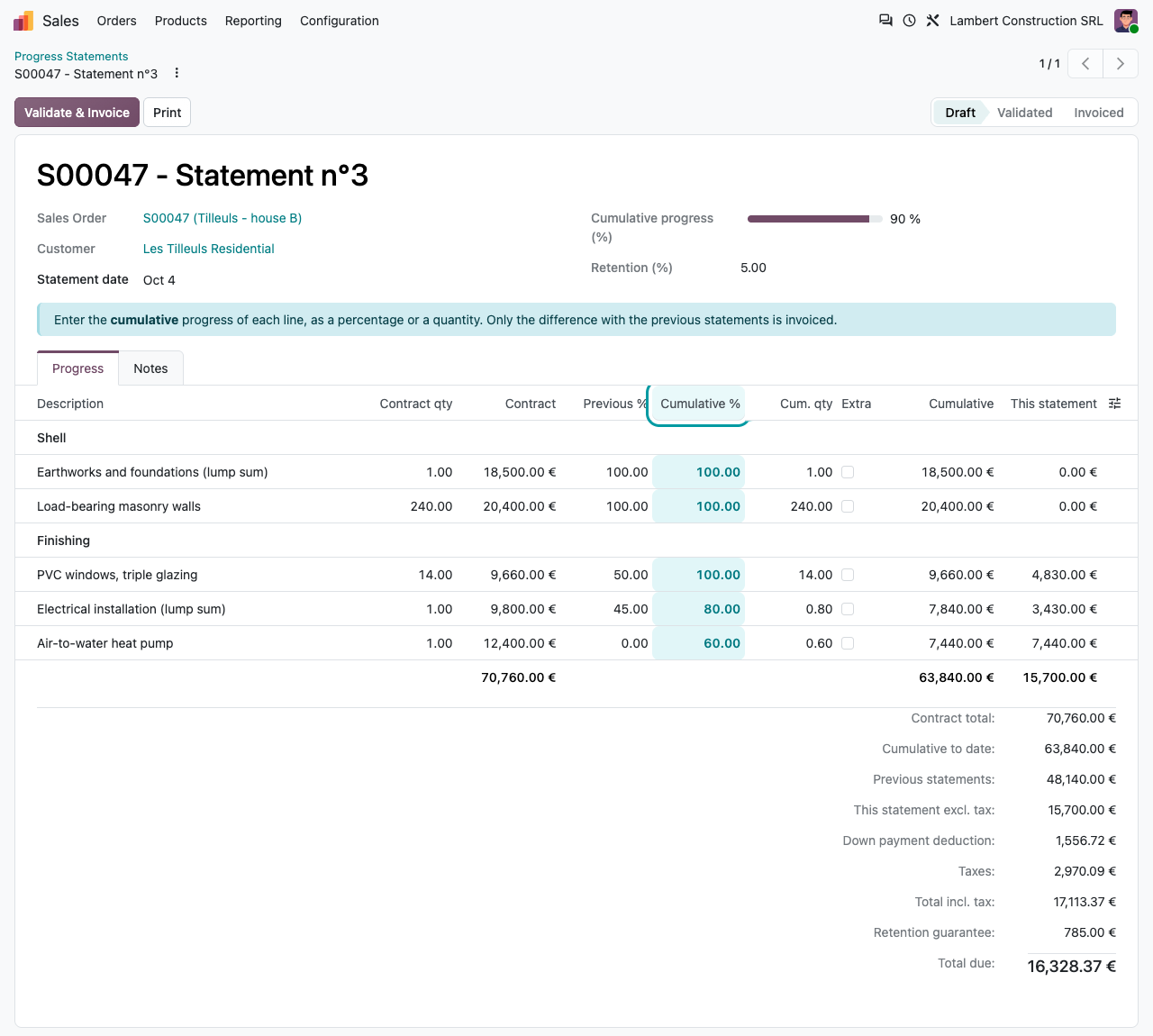
Cumulative progress, per line
Enter the progress to date as a percentage or as a quantity, whichever your site manager reports. Each new statement starts from the previous one.
Only the delta is invoiced
Validation creates the customer invoice for the difference with the previous statements. Invoice lines are linked to the order lines, so invoiced quantities stay right in Odoo.
Corrections become credit notes
Lower a percentage and the statement deducts it; when its total is negative, a credit note is issued instead, retention included. Above 100 % is refused unless you tick Extra work on the line.
Amounts you can check
Per line: contract amount, previous %, cumulative %, cumulative amount and this statement. Totals: down payment deduction, VAT, retention and total due.
The invoice
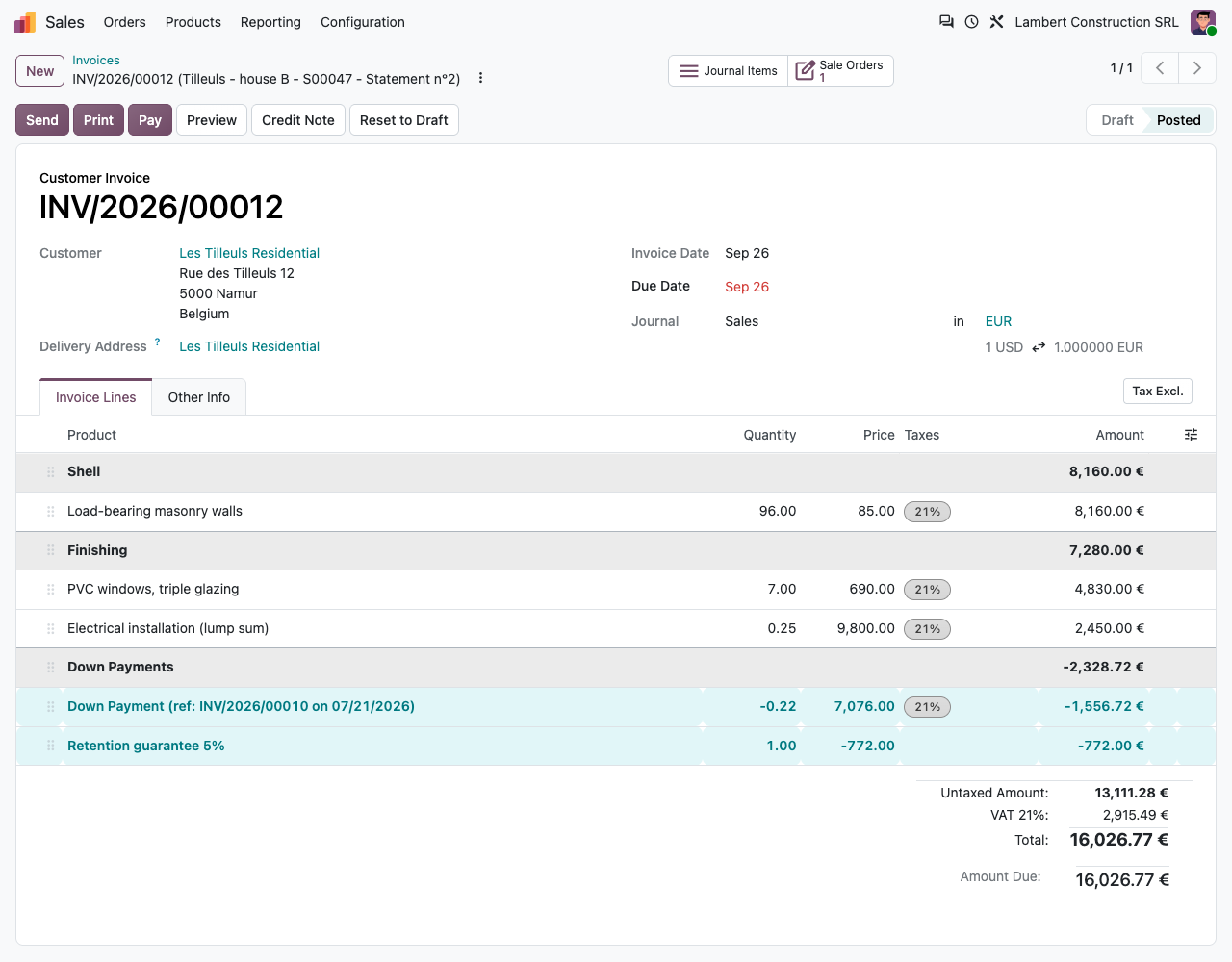
A normal Odoo invoice, with the right deductions
No parallel ledger: the statement produces a standard customer invoice (or credit note) that you post, send and reconcile as usual.
Retention guarantee
A separate negative line, without VAT, posted to the retention account you choose. Rate from the customer, else from the company (5 % by default), computed on the amount excl. or incl. tax.
Down payments
Down payments made with Odoo's standard wizard are deducted pro rata of the cumulative progress on every statement, or in full on the statement reaching 100 %.
Bank guarantee instead
Tick Replaced by a bank guarantee and store its reference: nothing is withheld, the release date is still tracked.
Multi-currency
The invoice uses the currency of the order; retention and deductions are rounded in that currency.
Printed statement
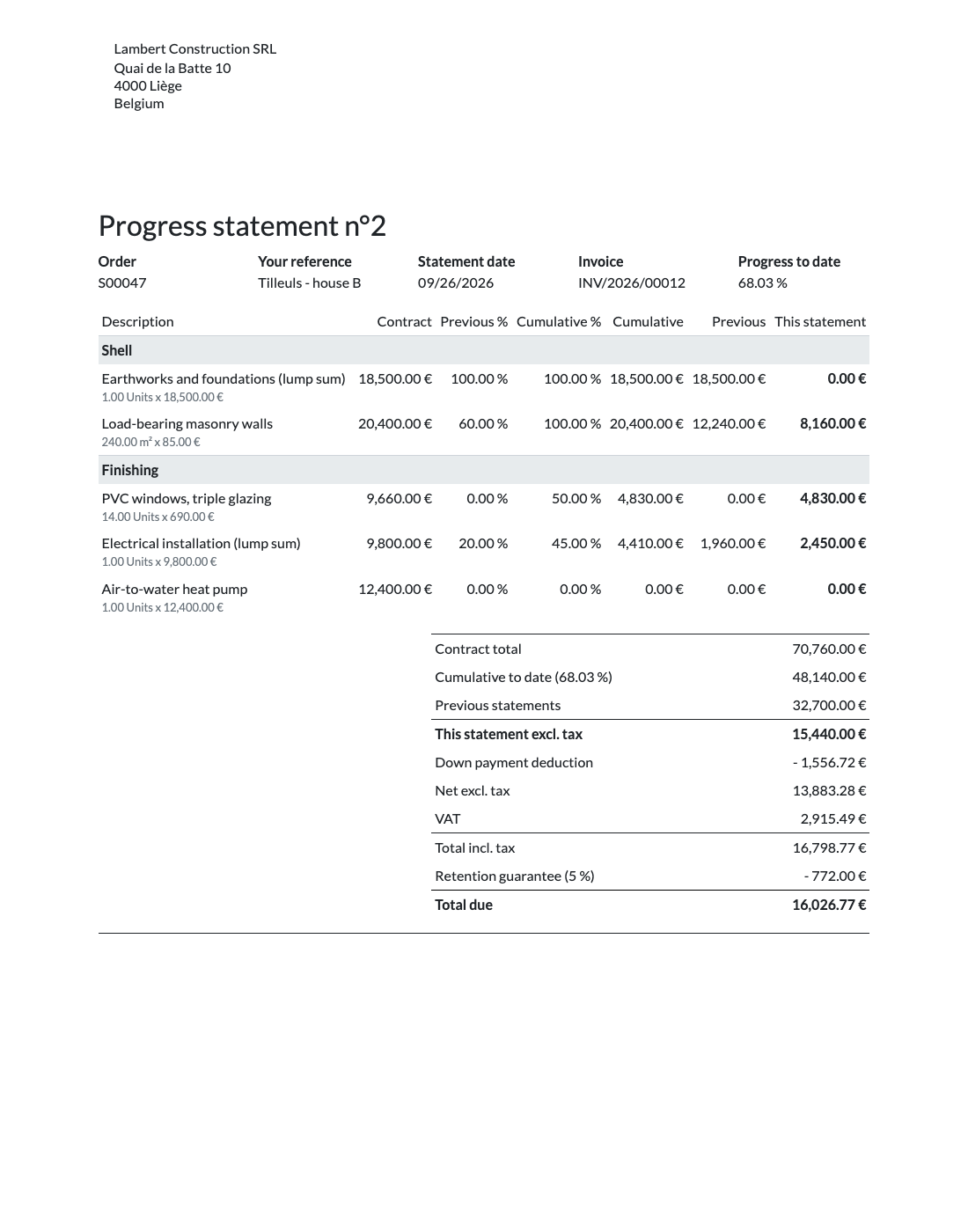
The recap table your customer expects
A Progress statement PDF per statement: contract, previous %, cumulative %, cumulative, previous and this statement per line, then contract total, cumulative to date, previous statements, down payment deduction, VAT, retention and total due. Printed in the customer's language: English and French included.
How it works
From the quote to the release
1
Set up the order
Tick Progress invoicing, check the retention rate, confirm. Ask for a down payment if needed.
2
Invoice each month
New Progress Statement, enter the cumulative %, Validate & Invoice. Print the statement for your customer.
3
Release the retention
Enter the reception date: the release date and a reminder follow. Release Retention creates the invoice for the total retained.
Retention guarantees
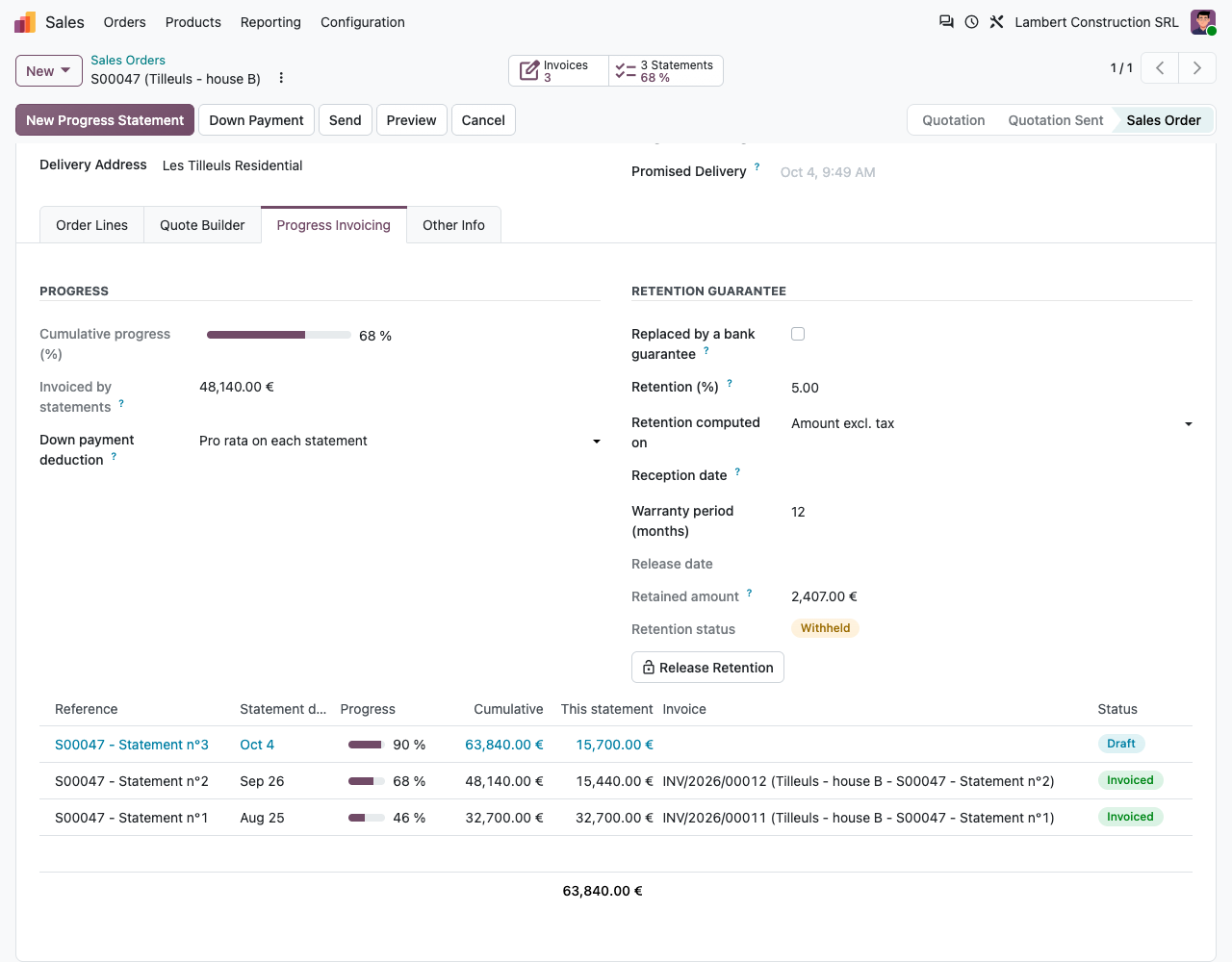
Never forget a retained amount
Release date and reminder
Reception date plus the warranty period (12 months by default) gives the release date. An activity is scheduled for the salesperson 30 days before (configurable).
Released once, with a clear trail
One release invoice for the whole retained amount, with one line per invoice it was withheld on. A second release is refused. On a reconcilable account, the amounts are matched when you post it.
One list for the whole company
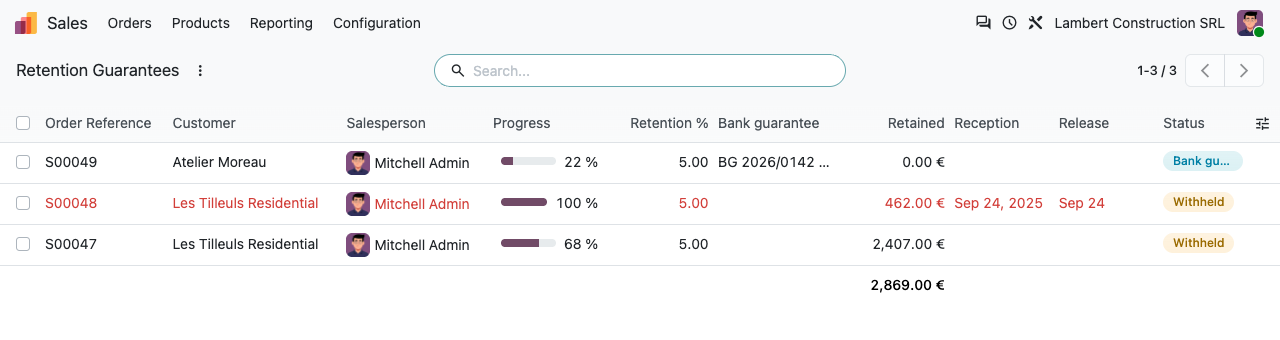
Retention Guarantees, in Sales and in Invoicing > Customers: retained amount, reception and release dates, bank guarantees. Overdue releases show in red.
Settings in one place
Sales > Configuration > Settings > Progress Invoicing: default rate, base (excl./incl. tax), retention account, warranty period, reminder delay. Customers can have their own rate.
Under the hood
Precise details
Lump-sum lines and percentages
Progress is stored as a quantity of the order line. With Odoo's default accuracy (2 decimals), a lump-sum line of quantity 1 moves in steps of 1 %: 33.33 % becomes 33 %. Need finer steps? Raise the decimal accuracy of Product Unit (Settings > Technical > Decimal Accuracy, developer mode). Pro rata down payment deductions follow the same accuracy, and the down payment is always deducted in full at 100 %.
FAQ
Good to know
Can I mix progress invoicing with regular invoices on the same order?
No. Progress invoicing is enabled per order and cannot be switched on once regular invoices exist (down payments are fine). Other orders keep the standard invoicing.
Which account should hold the retention?
A dedicated current asset account, for example 4117 Clients - retenues de garantie. Receivable-type accounts are not offered, so the retained amount is never proposed when you register the customer payment.
Can the retention be computed on the amount incl. VAT?
Yes: choose Amount incl. tax in the settings or on the order (common in France). The default is the amount excl. tax.
What about extra work and amendments?
Add the lines to the order: the next statement includes them. To invoice more than the ordered quantity on a line, tick Extra work on that statement line.
Can I customise the PDF?
It uses your company document layout. The template report_progress_statement_document can be adapted with Studio (Enterprise) or a small module.
A question? A problem? Talk to the people who built it.
We will get back to you within 8 business hours.

Email us directly at
Published by
Nalios — Odoo Gold Partner, Belgium — nalios.be