Customer Assortments for B2B
Customer-specific product assortments: flag or block products outside the assortment on quotations, print customer product codes, warn before delisting.


Présentation du module

/ Odoo 20 · Sales
Each customer, its own catalog
Wholesalers, catering suppliers and B2B distributors negotiate a range with each customer. Customer Assortments puts that range in Odoo: products outside it are flagged or blocked on quotations, the customer's own article codes are printed on every document, and your webshop only shows each customer what they can buy.

Assortments
The negotiated range, in one place
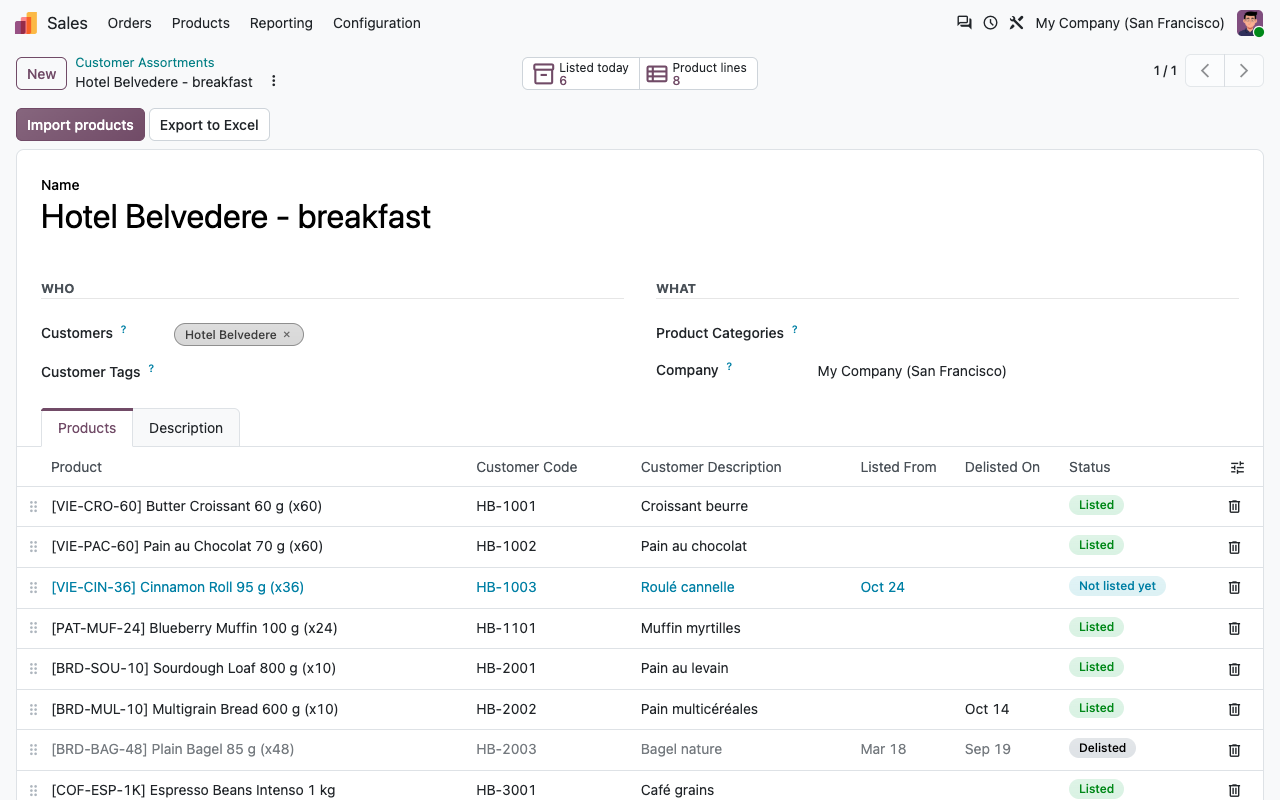
An assortment is a named list of products and product categories. Built for wholesalers, catering suppliers, central purchasing and distributors who sell a different range to each customer.
Products and categories
List products one by one, or add whole product categories (subcategories included). A product line can exclude one product of a category, for example when it is delisted.
Customer codes and names
Each product line holds the customer's own article code and description, the way the customer orders it.
Listing and delisting dates
A product can be listed from a date and delisted on another. The status shows Listed, Not listed yet or Delisted.
Assigned the way you sell
To a customer, to a company (its contacts and delivery addresses inherit), or to a customer tag such as Horeca. Several assortments of a customer add up.
Quotations
Off-range products never slip through
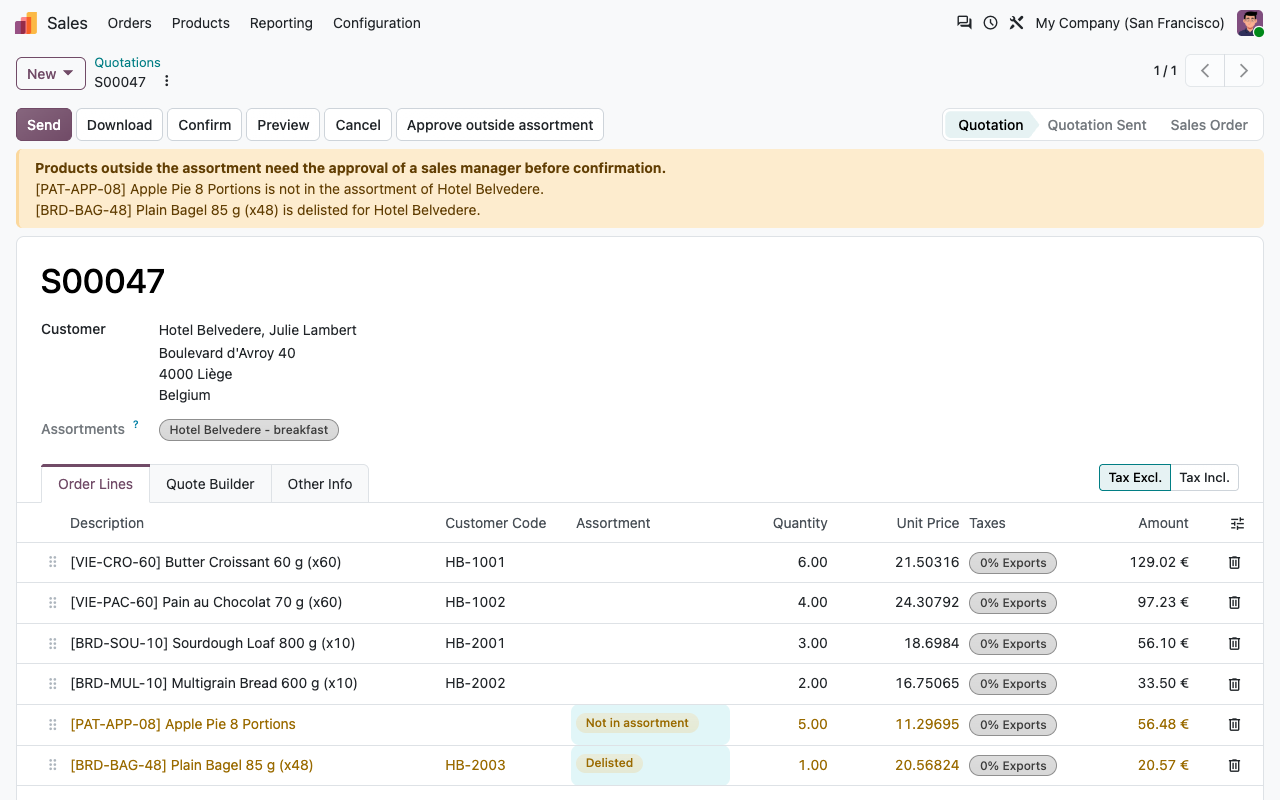
On quotations, each line is checked against the assortments of the customer on the order date.
Flagged on the line
Lines outside the assortment are highlighted with Not in assortment, Not listed yet or Delisted, a warning pops up when the product is chosen, and a banner lists them on top of the quotation.
Warning or blocking
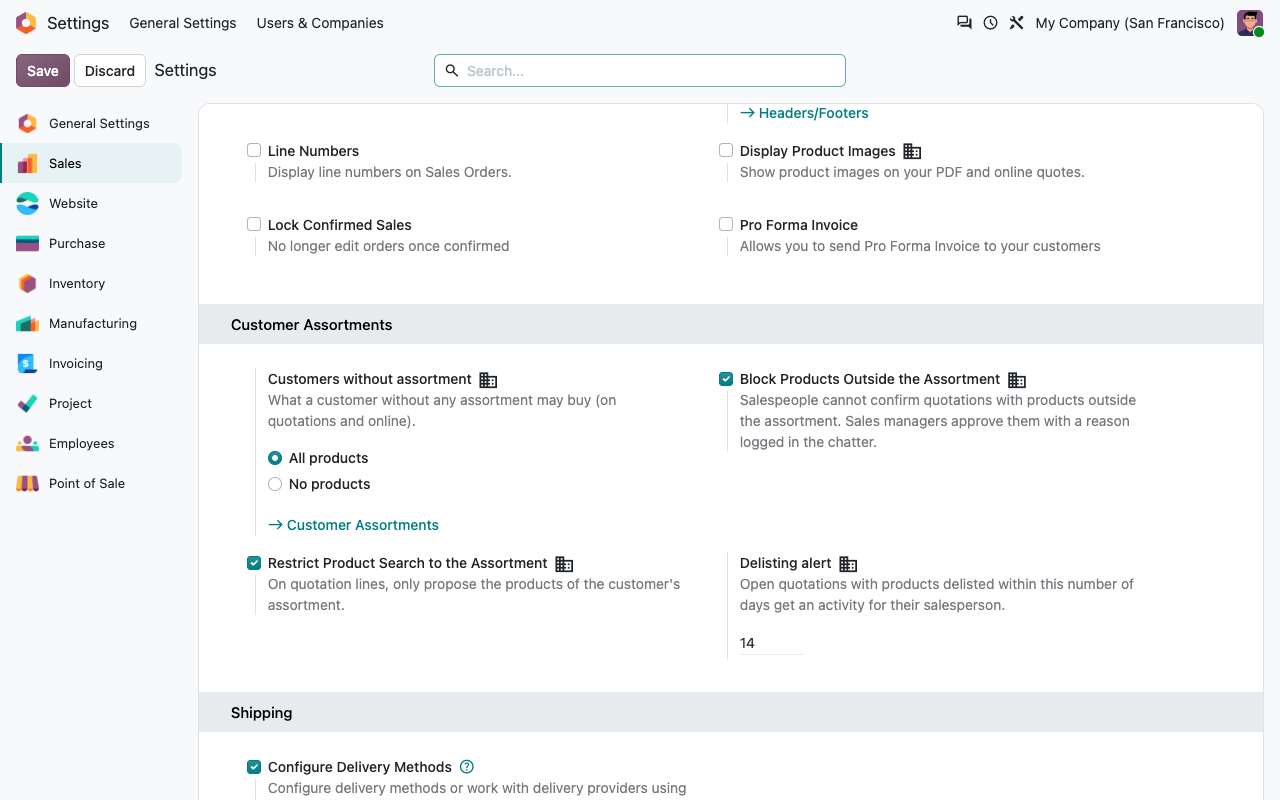
You choose: a simple warning, or salespeople cannot confirm the quotation until the off-range products are removed or approved.
Manager approval
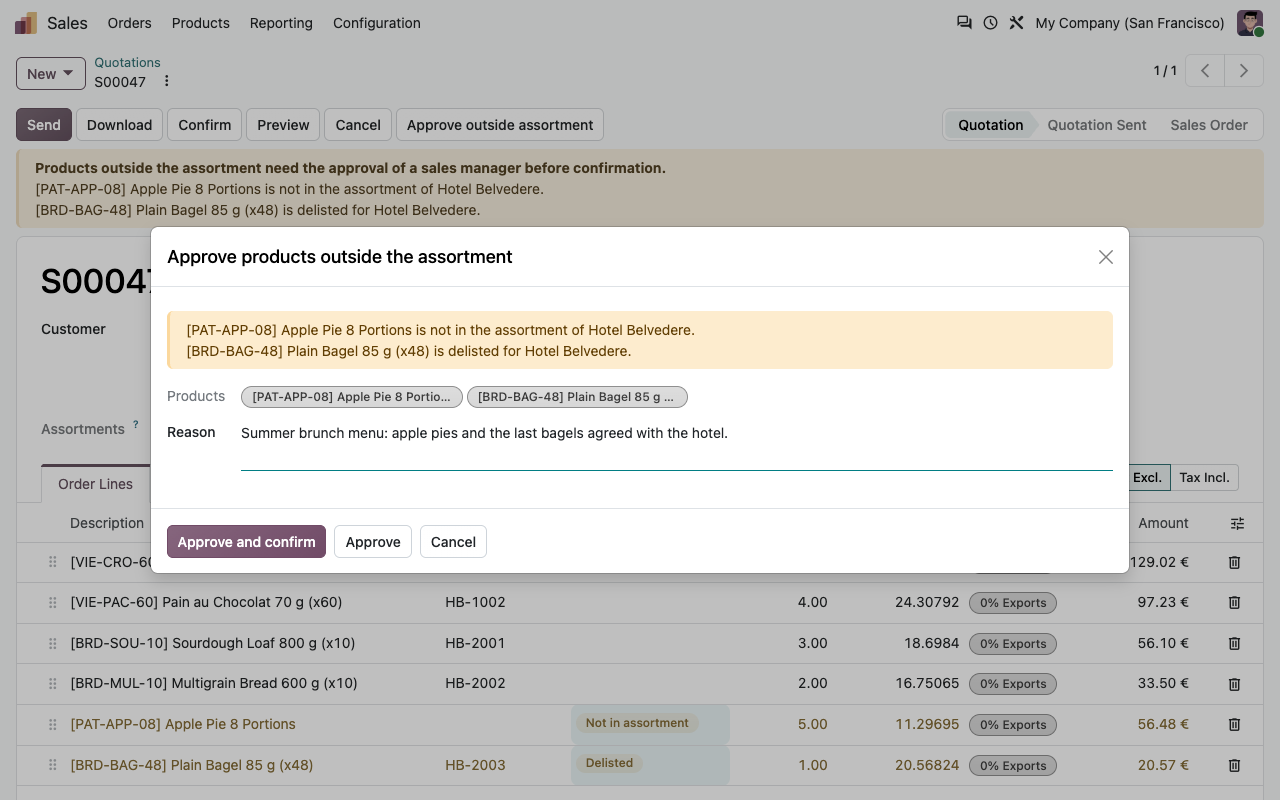
A sales manager clicks Approve outside assortment and gives a reason. The products and the reason are logged in the chatter. The approval covers those products only.
Online orders run free
Portal signatures and online payments are not blocked: on the webshop, the eCommerce add-on already keeps customers inside their assortment.
Control
Approve with a reason, search within the range
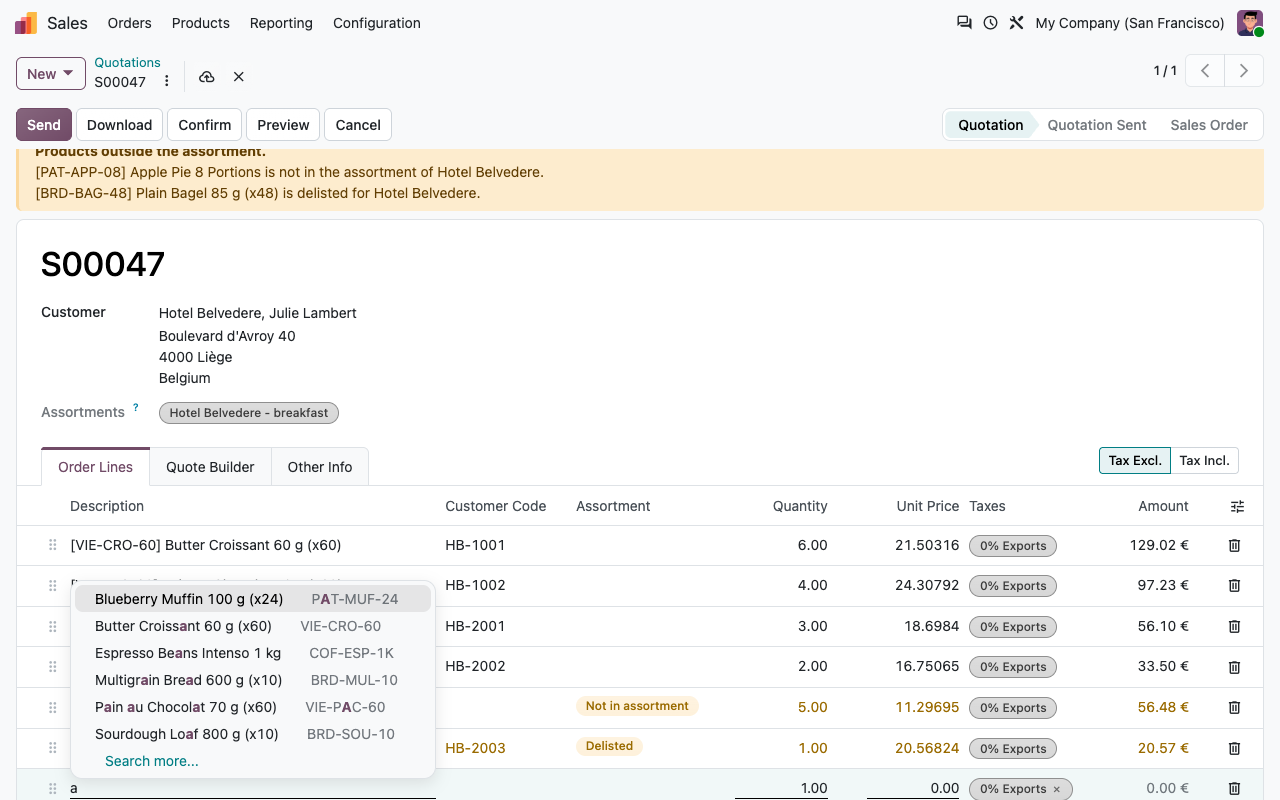
Approvals are traced in the chatter. With the Restrict product search setting, the product field of quotation lines only proposes the customer's assortment (the product catalog of the quotation too, from Odoo 17).
A sales manager approves products outside the assortment with a reason
The product search of a quotation line only proposes the assortment
Documents
The customer's codes on every document
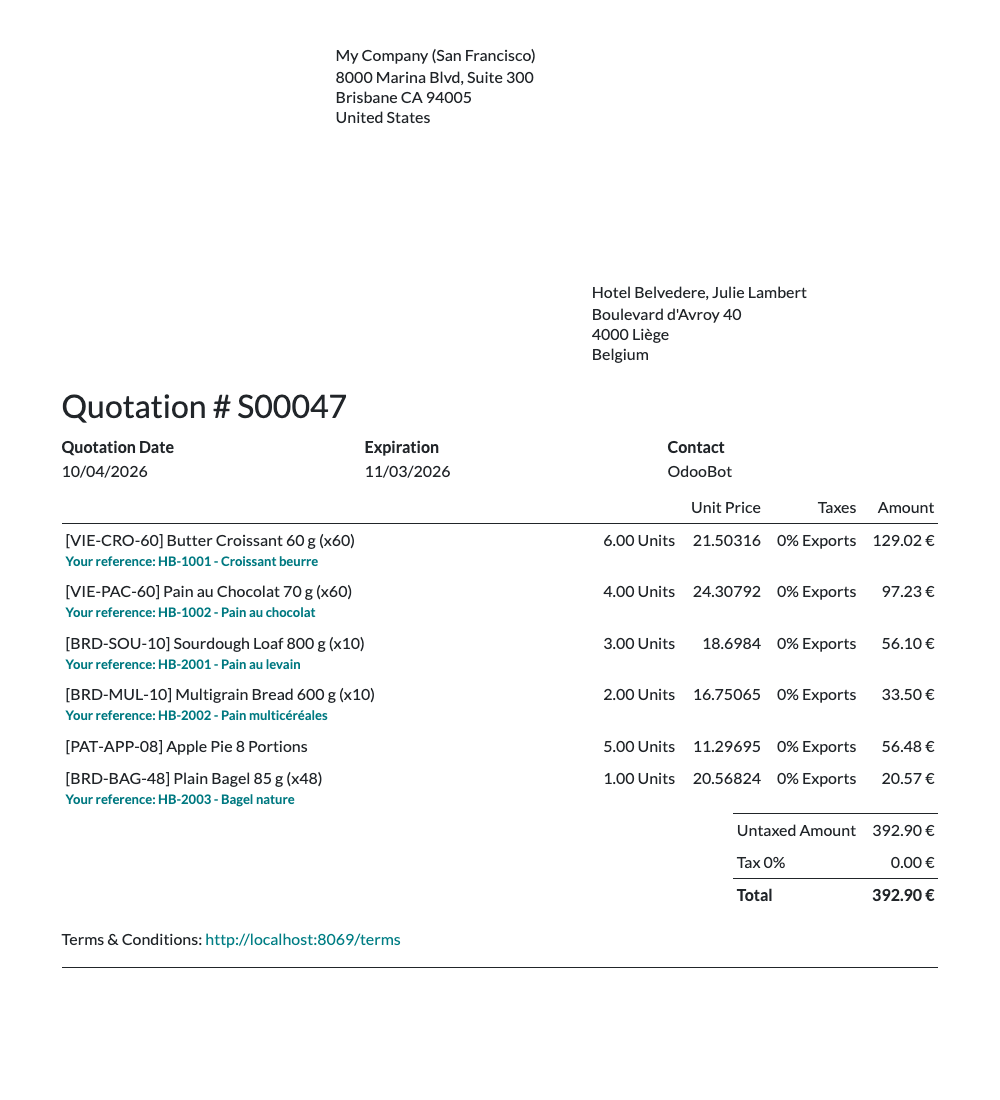
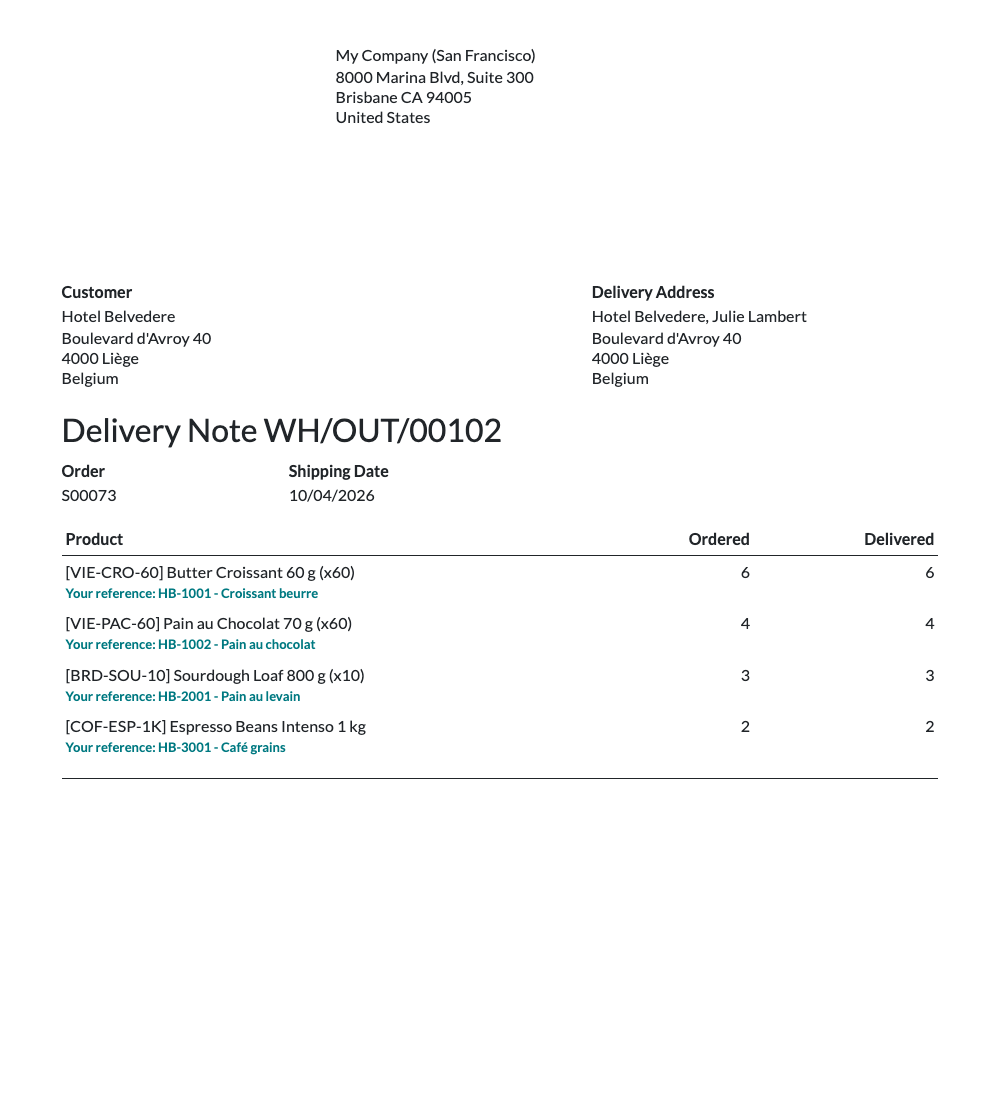
When the assortment holds a customer code or description, it is printed under the product as Your reference on quotations, sales orders, delivery slips and invoices. It is saved on the order and invoice lines, so later changes to the assortment do not rewrite past documents.
Quotation with the customer's own references
Delivery slip with the customer's own references
Day to day
Excel in, Excel out
Customers send their range as a spreadsheet. Import it, and export it back when they ask for an update.
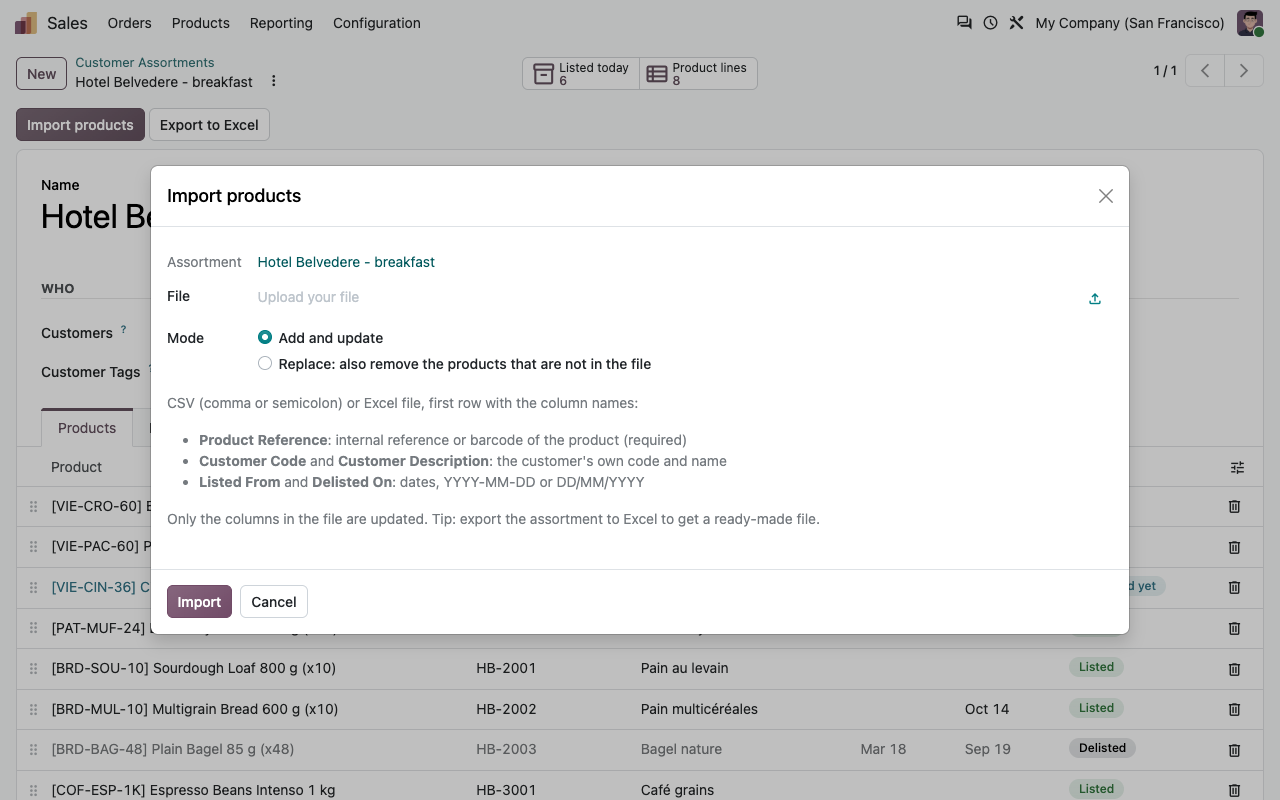
Import CSV or Excel
Columns: product reference (internal reference or barcode), customer code, customer description, listed from, delisted on. English and French column names, dates as YYYY-MM-DD or DD/MM/YYYY.
Add, update or replace
Only the columns in the file are updated. In Replace mode, products that are not in the file leave the assortment. Unknown references are listed, the rest is imported.
Export to Excel
One click gives the assortment as an Excel file in the same format: a ready-made template to send to the customer.
Delisting alert
Every night, open quotations containing products delisted within the next days (14 by default) get a Delisting activity for their salesperson, with the products and their dates.
Overview
Every line, every customer
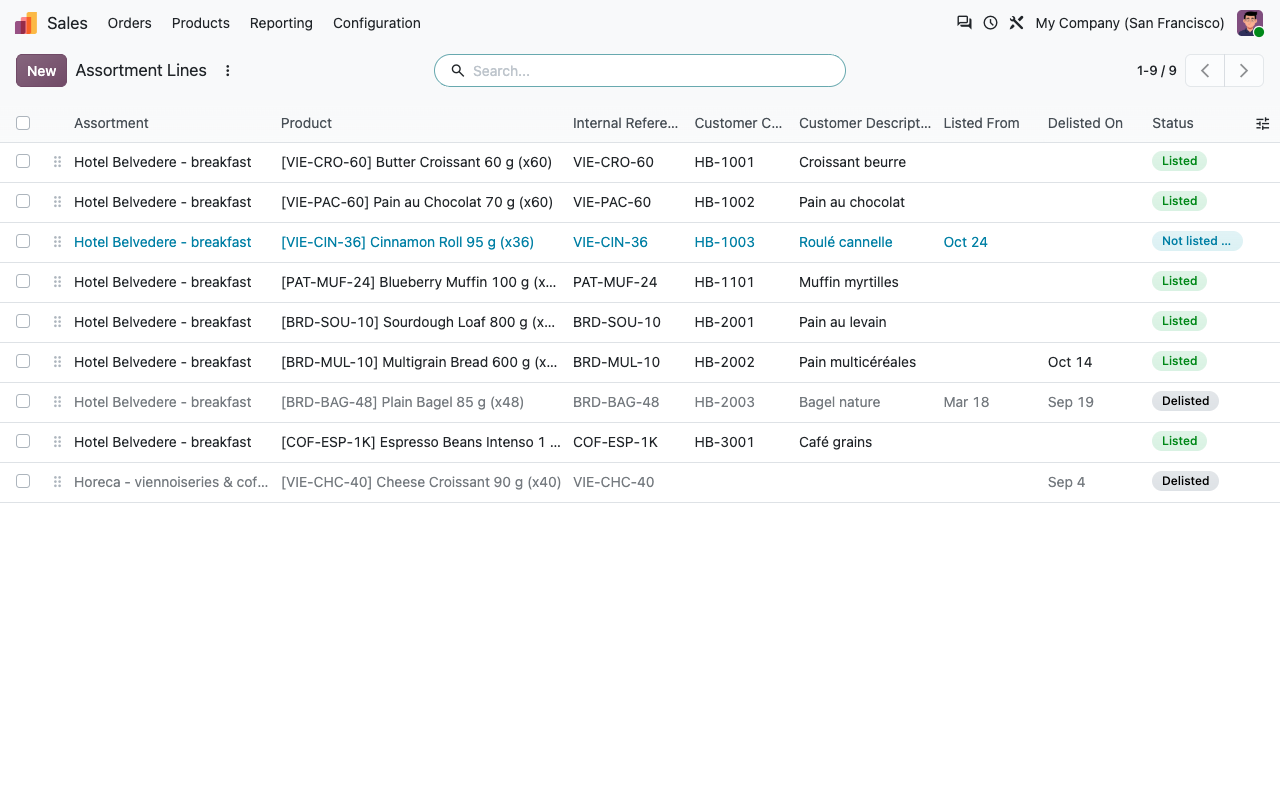
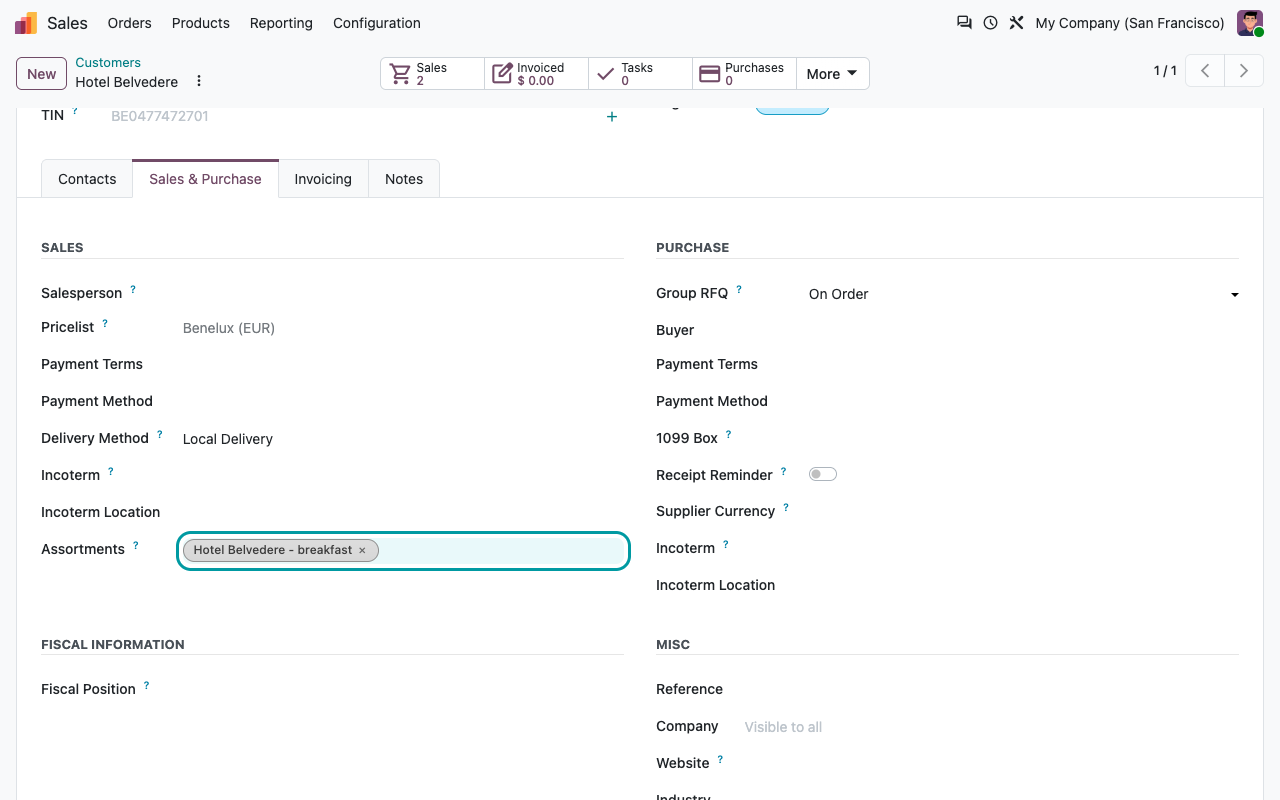
Sales > Products > Assortment Lines lists all lines with filters (listed, not listed yet, delisted, delisted soon). The customer form shows its assortments, including the ones it gets from its company or its tags.
All assortment lines with their status
Assortments of a customer
eCommerce add-on
A webshop per customer
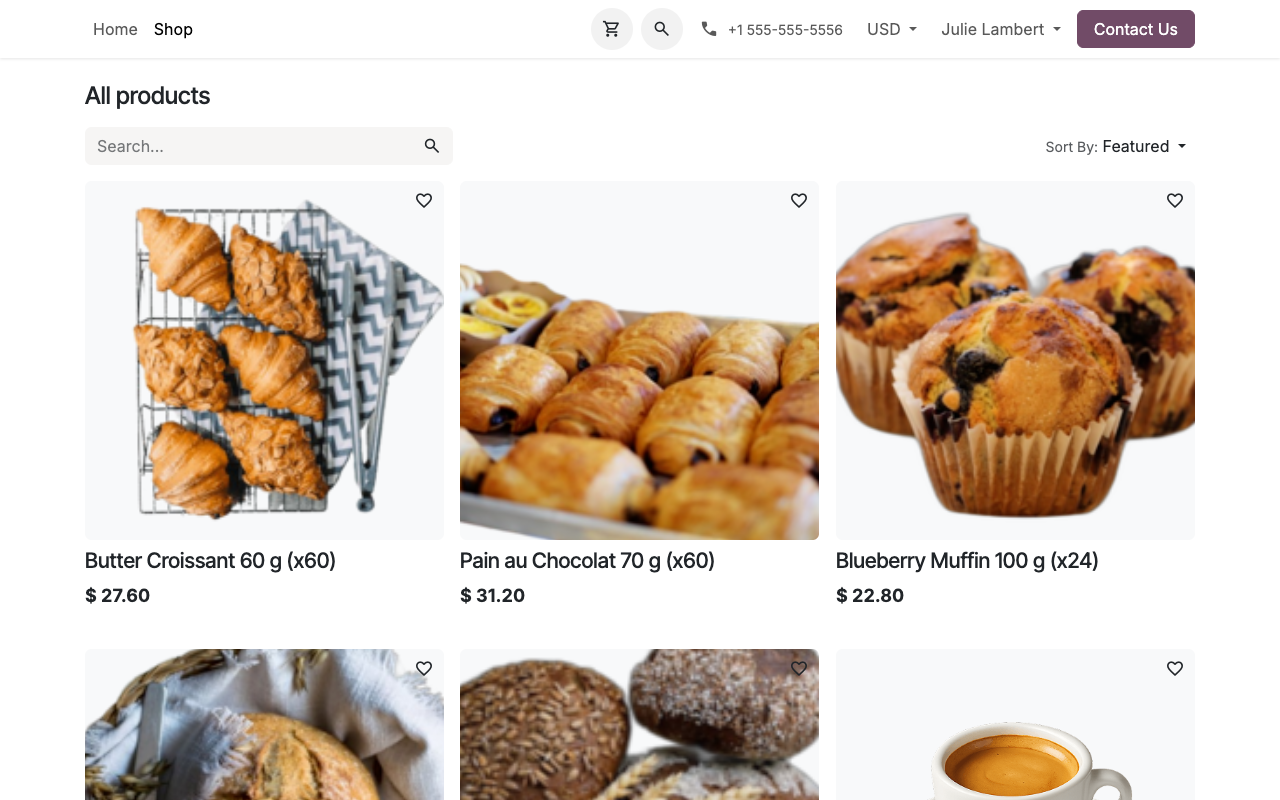
The free eCommerce add-on is installed automatically when you use eCommerce. Logged-in customers only see and buy the products of their assortment.
Shop, search and pages
Product lists, search, product snippets, accessories and alternative products only show the assortment. The URL of another product returns a 404 page.
Checked on the server
The cart refuses other products even when called directly, and checkout is blocked while the cart still holds products outside the assortment (for example after the customer logs in).
Visitors not logged in
Per website: they see all products, no product (log in to see the catalog), or the products of a public assortment.
Your team sees everything
Internal users are never restricted on the webshop.
Setup
Ready in ten minutes
1
Choose the rules
Sales > Configuration > Settings > Customer Assortments: what customers without assortment may buy, warning or blocking, restricted product search, delisting alert.
2
Create the assortments
Sales > Products > Customer Assortments: add categories and products, or import the customer's file.
3
Assign them
Select customers, companies or customer tags on the assortment, or on the customer form.
4
Open the webshop
Website settings: choose what visitors who are not logged in see. Customers log in through the portal.
Under the hood
How it works
FAQ
Good to know
Does it change prices?
No. Assortments decide what a customer may buy, not at which price: keep using pricelists for that.
Can a contact have its own assortment?
Yes. A contact or delivery address gets its own assortments plus the ones of its company and of the company tags.
What happens to existing documents?
Customer codes are copied on order and invoice lines when they are created. Existing documents are not changed at installation.
Is the webshop restriction a security feature?
It covers the shop, search, product pages, snippets and the cart on the server side. Product names and prices can still appear in places that do not use the shop rules, such as a link shared in an email.
Which languages?
English and French (also used for fr_BE).
A question? A problem? Talk to the people who built it.
We will get back to you within 8 business hours.

Email us directly at
Published by
Nalios — Odoo Gold Partner, Belgium — nalios.be