Daily Production Planning for Food Artisans
Plan what each workshop bakes or cooks tomorrow from your orders, print wall sheets, ingredient shortages and labels, and compare planned with sold.


Présentation du module

/ Odoo 20 · Manufacturing
Tomorrow's production, planned in one click
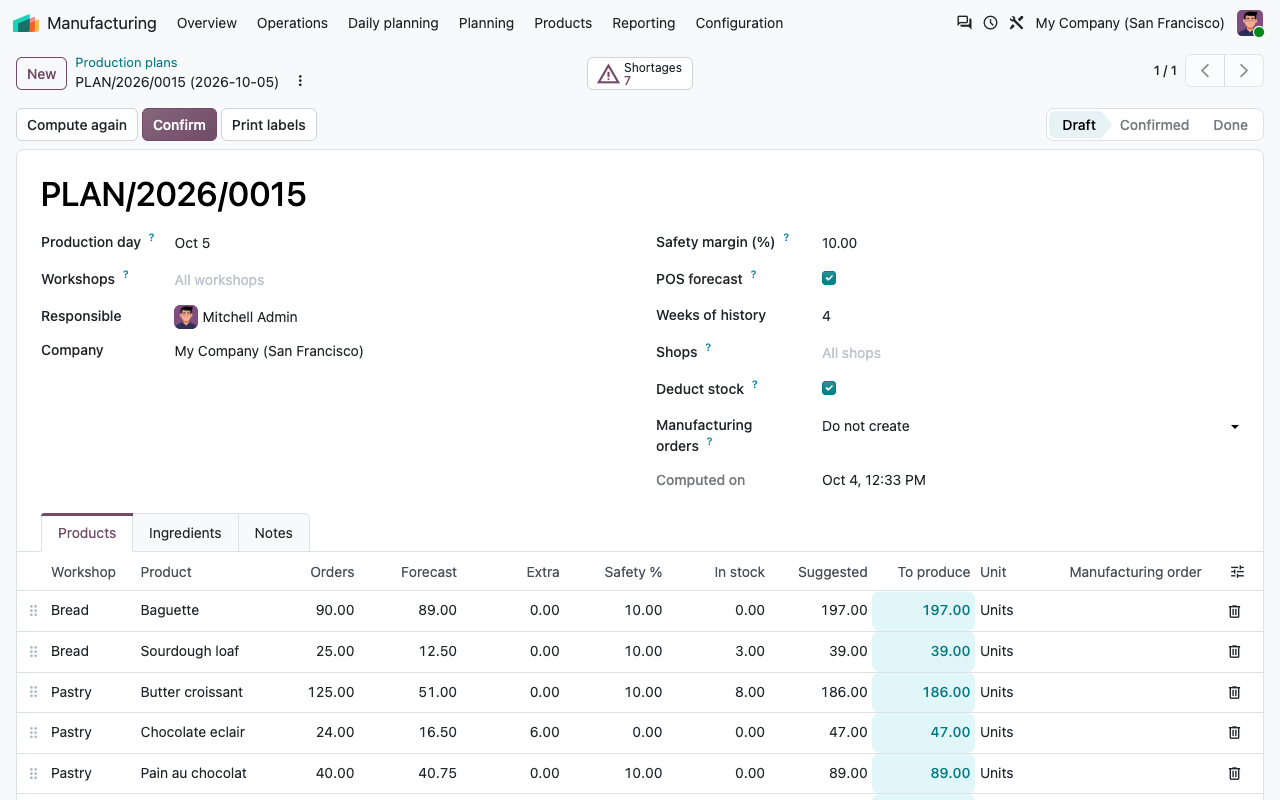
Every evening, compute what each workshop bakes or cooks for the next day: the confirmed orders of that day, your counter sales forecast, your extras and a safety margin, minus what is left in stock. Then print a big sheet for each workshop wall, the ingredients to take out and the labels.
What it does
One plan a day, every source visible
Built for bakeries, pastry shops, caterers, delis and small food workshops that produce every day what they sell the next day, from orders and from the counter.
Workshops
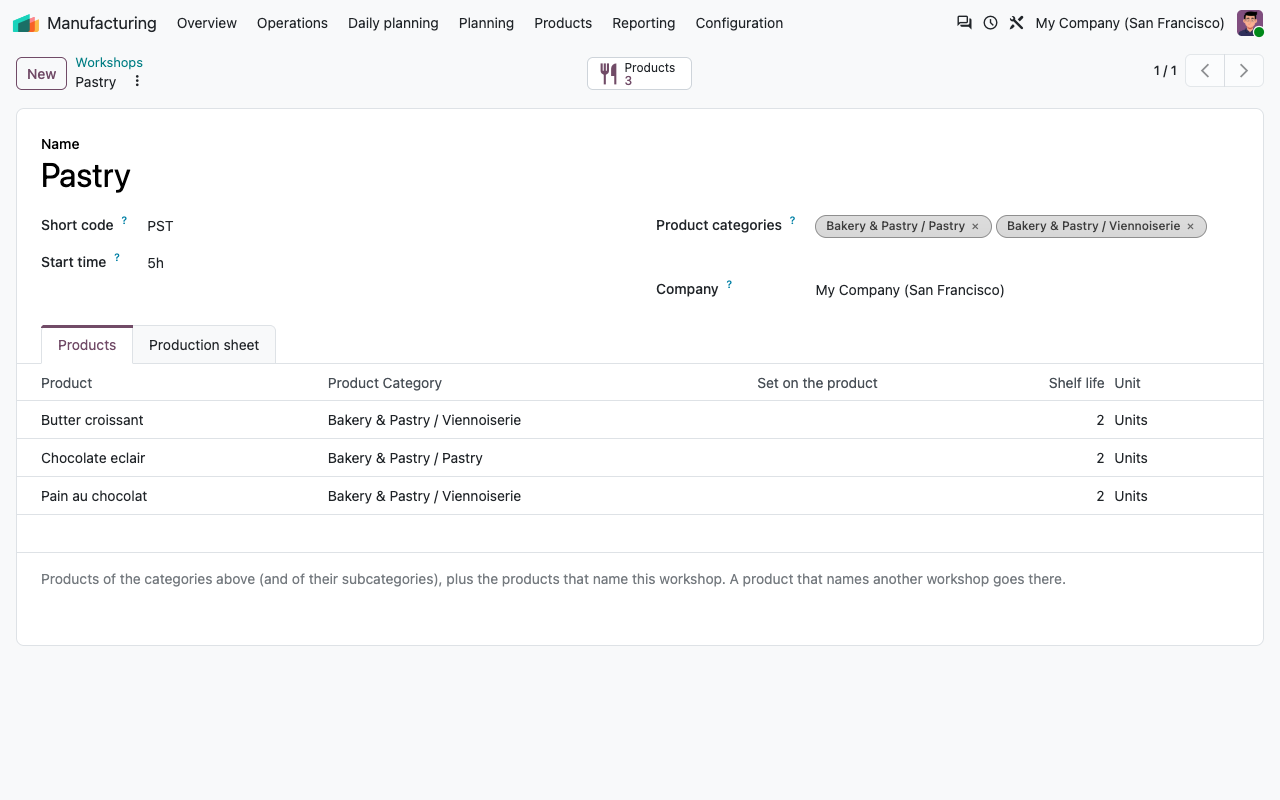
Bread, Pastry, Kitchen... Link product categories (subcategories included) or single products to a workshop. Each workshop has a start time and a note printed on its sheet.
Compute, then adjust
Pick the day and click Compute: one line per product with its orders, forecast, extra, safety margin and stock, and the suggested quantity. Change the final quantity if you know better.
The orders of the day
Confirmed sales orders count on their delivery date, in your time zone (order date + customer lead time when there is none). Quotations and cancelled orders do not.
Rounded the way you bake
Quantities are rounded up to whole units or to full trays (multiples of 12...). A product can have its own safety margin. Yesterday's leftovers can be deducted.
At the counter
Your counter sales, forecast
With the free Point of Sale add-on (installed automatically when you use the Point of Sale), the plan also forecasts what you will sell over the counter.
Same weekday
The forecast is the average sold on the same weekday over the last N weeks (4 by default): a Saturday is compared with Saturdays.
Closed days left out
A day without any Point of Sale sale (holiday, closing day) does not lower the average. Refunds are deducted.
Per shop
Forecast all your Points of Sale, or only some of them, per plan.
Margin on top
The safety margin applies to orders and forecast, never to the extras you type yourself.
On the wall
One sheet per workshop, labels for the shelf
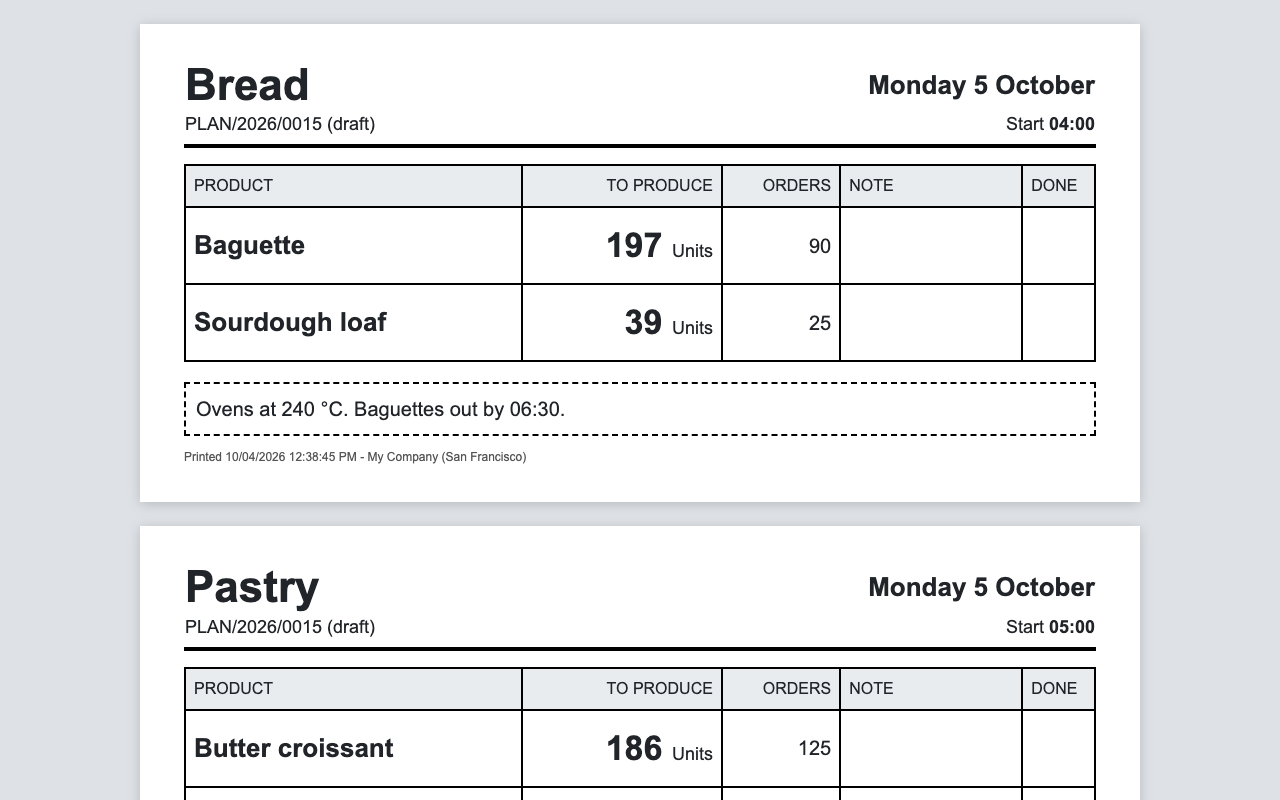
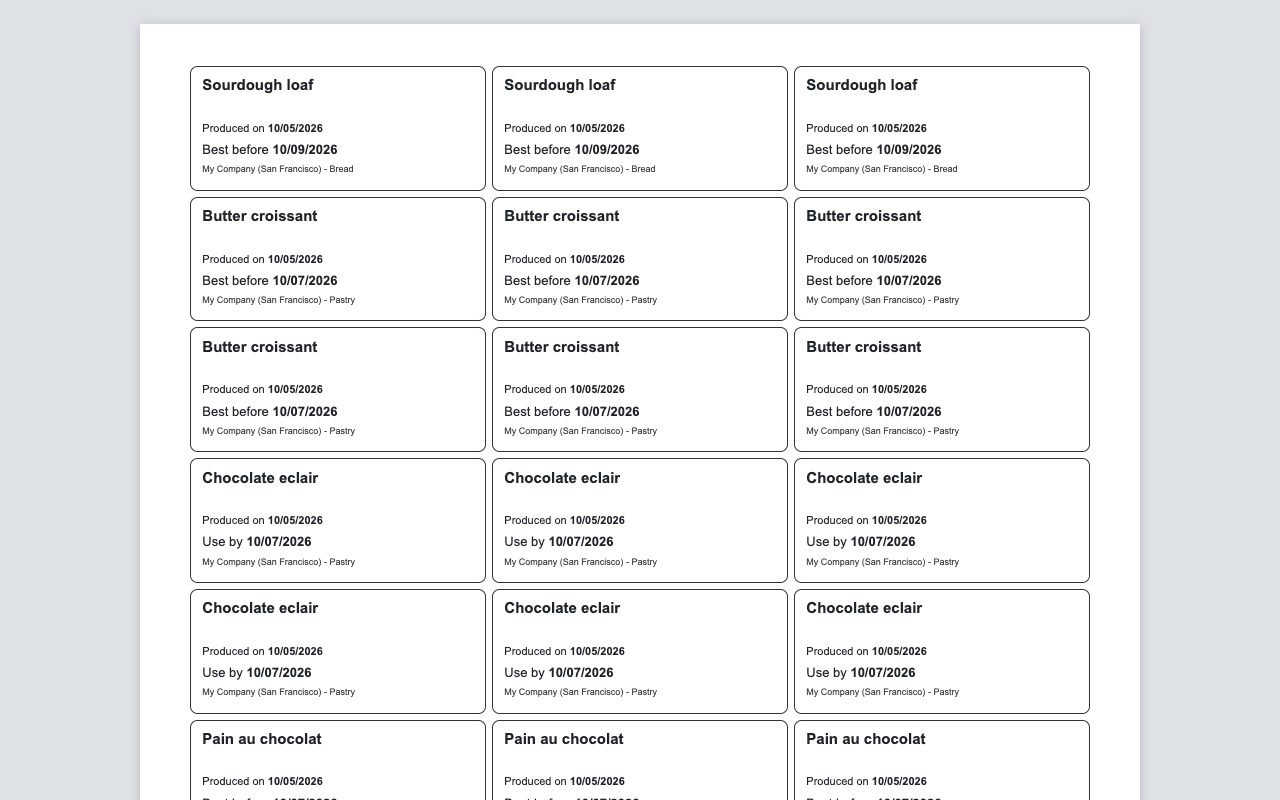
The production sheet prints one A4 page per workshop with big, readable quantities, the orders of the day, your notes and a Done column. Labels show the production date and the best before or use by date computed from the shelf life of the product.
Production sheets, one page per workshop
Product labels with production date and best before / use by date
Ingredients
What to take out, what is missing
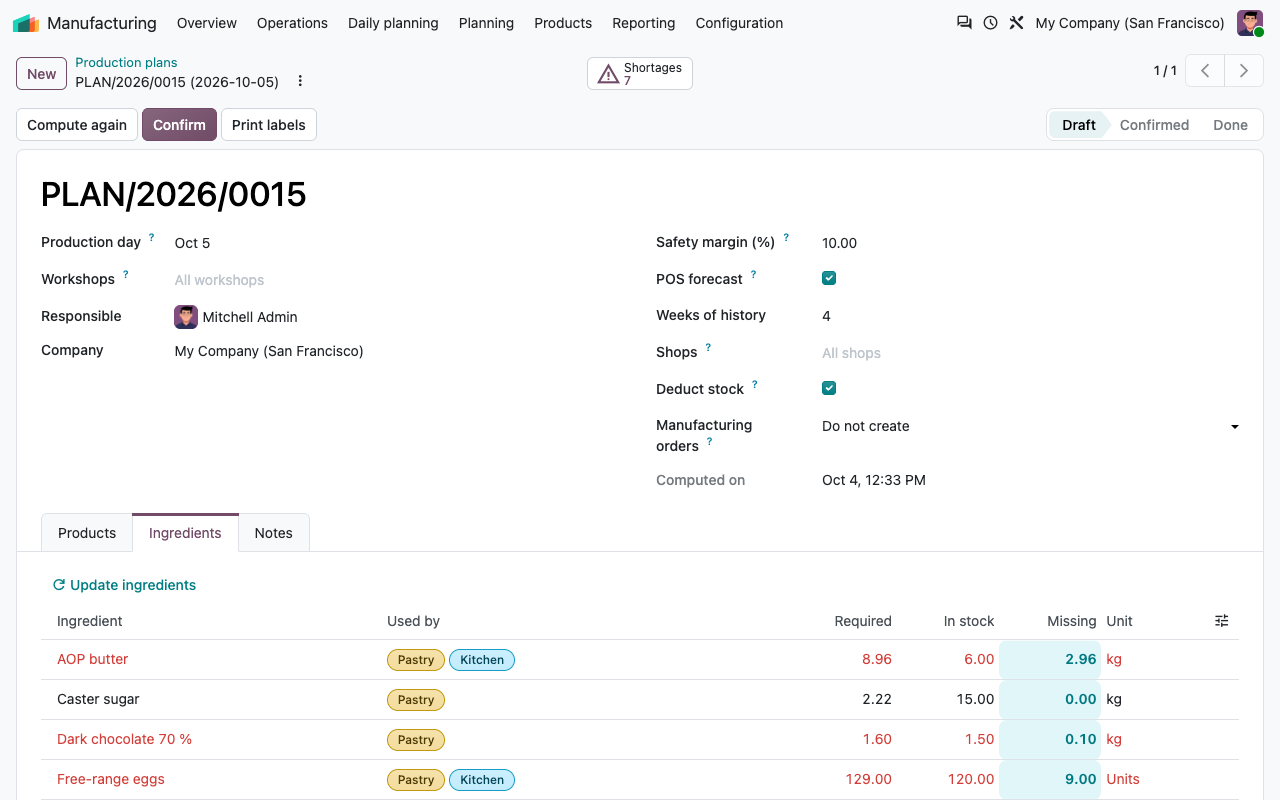
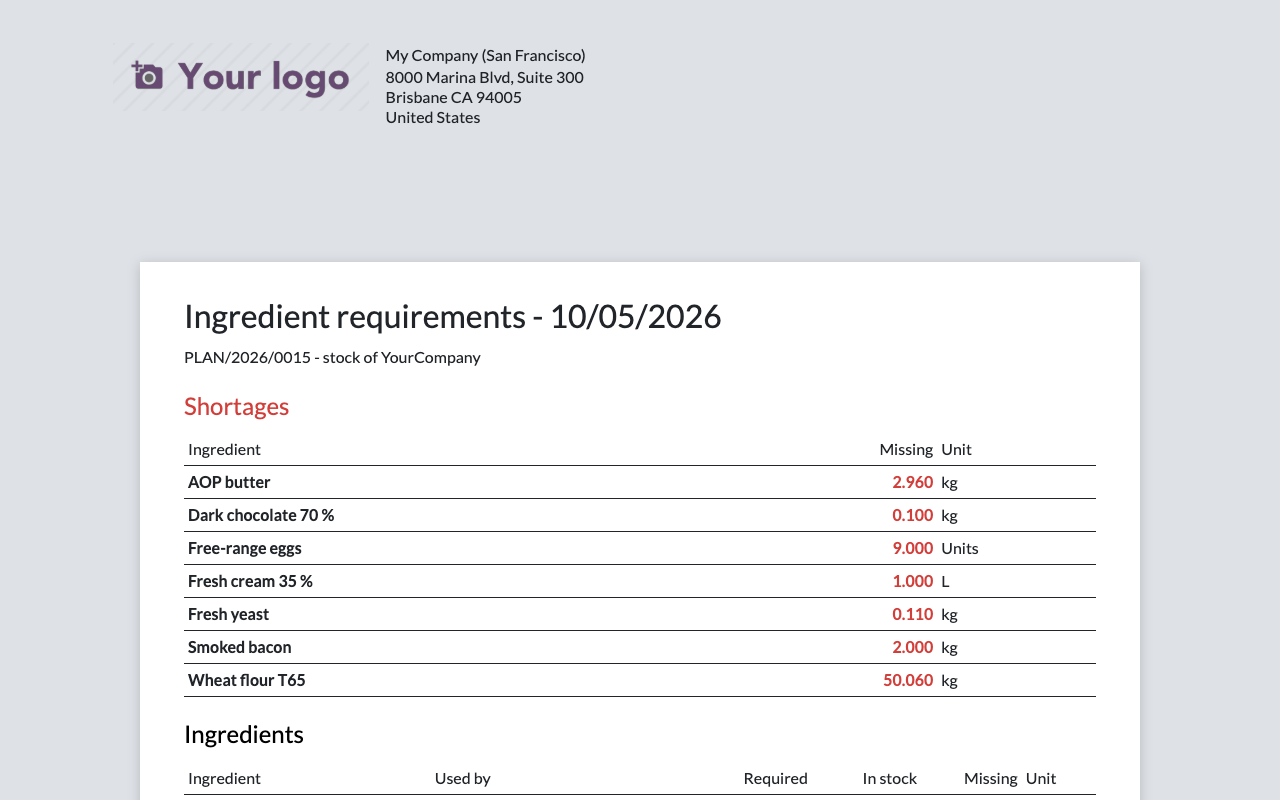
The bills of materials of the final quantities are exploded down to the raw ingredients, sub-recipes included (croissant dough, pastry cream, shortcrust...), with unit conversions (grams in a recipe, kilograms in stock, dozens or units). Each ingredient is compared with the stock on hand of the warehouse: shortages show in red, in the plan and on the printed list.
Ingredients of the plan, compared with the stock
Ingredient requirements report with the shortage list
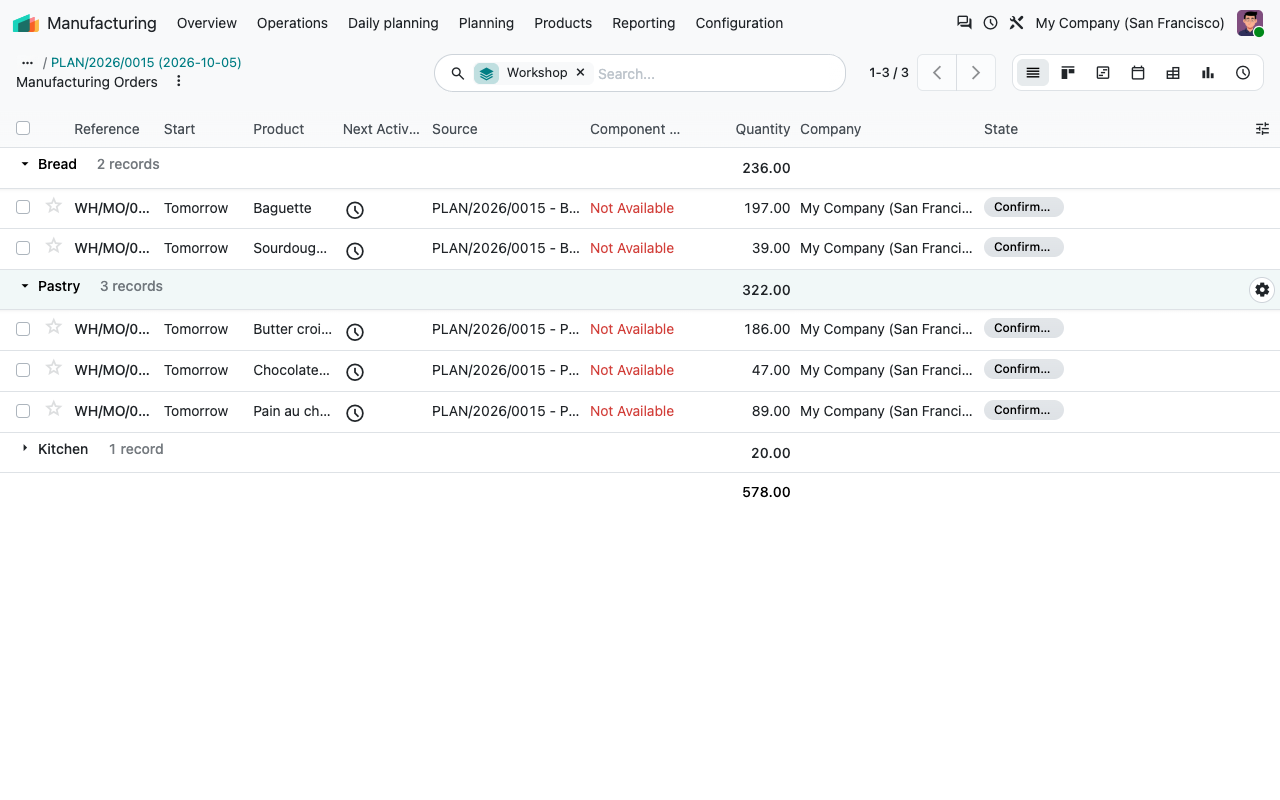
Manufacturing orders
Manufacturing orders if you want them
Off by default: the plan, the sheets, the ingredients and the labels work without them.
On confirm
Choose One per product and confirming the plan creates and confirms a manufacturing order for each product with a bill of materials.
Never twice
Confirm again, or click Create manufacturing orders: only the products without an order (or with a cancelled one) get a new one.
Per workshop
Each order is scheduled at the start time of its workshop, carries the workshop and is grouped by workshop from the plan.
Nothing hidden
Products without a bill of materials are listed in the chatter of the plan instead of being skipped silently.
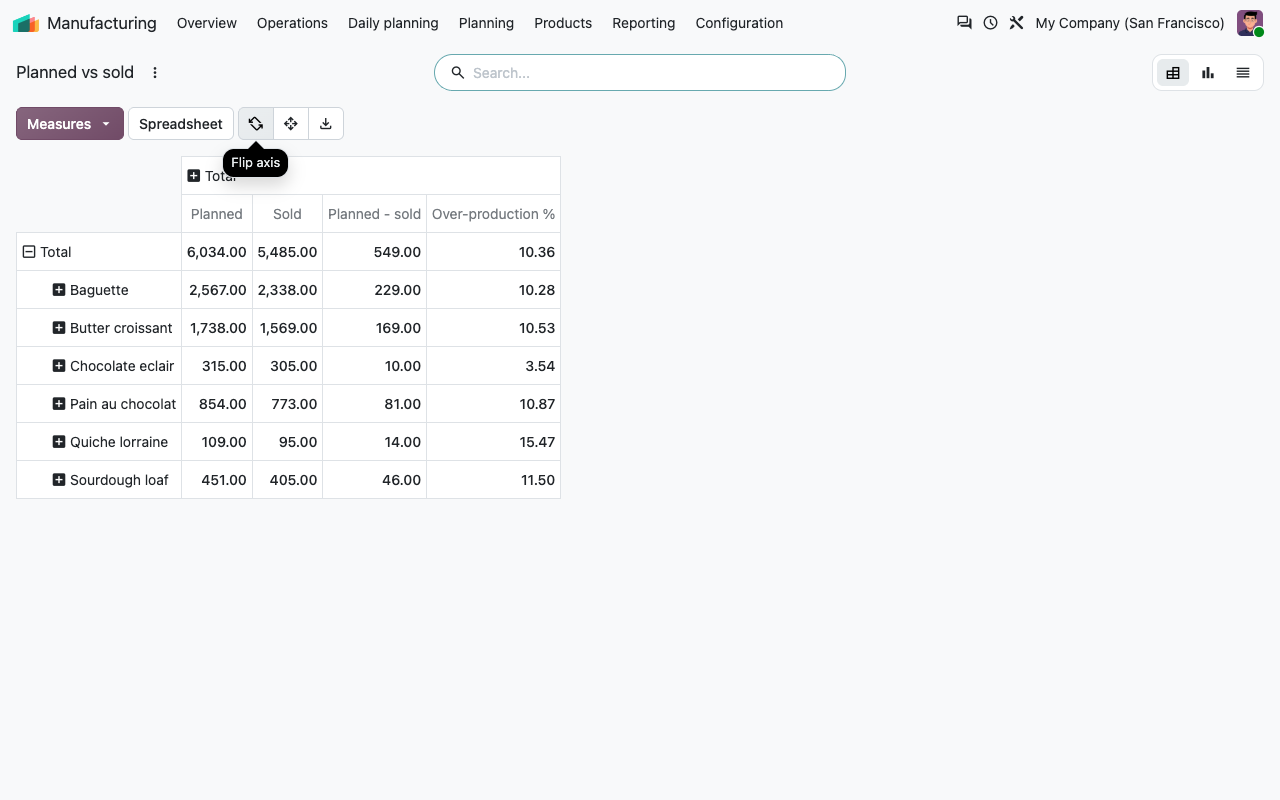
Planned vs sold
Tune your margin with facts
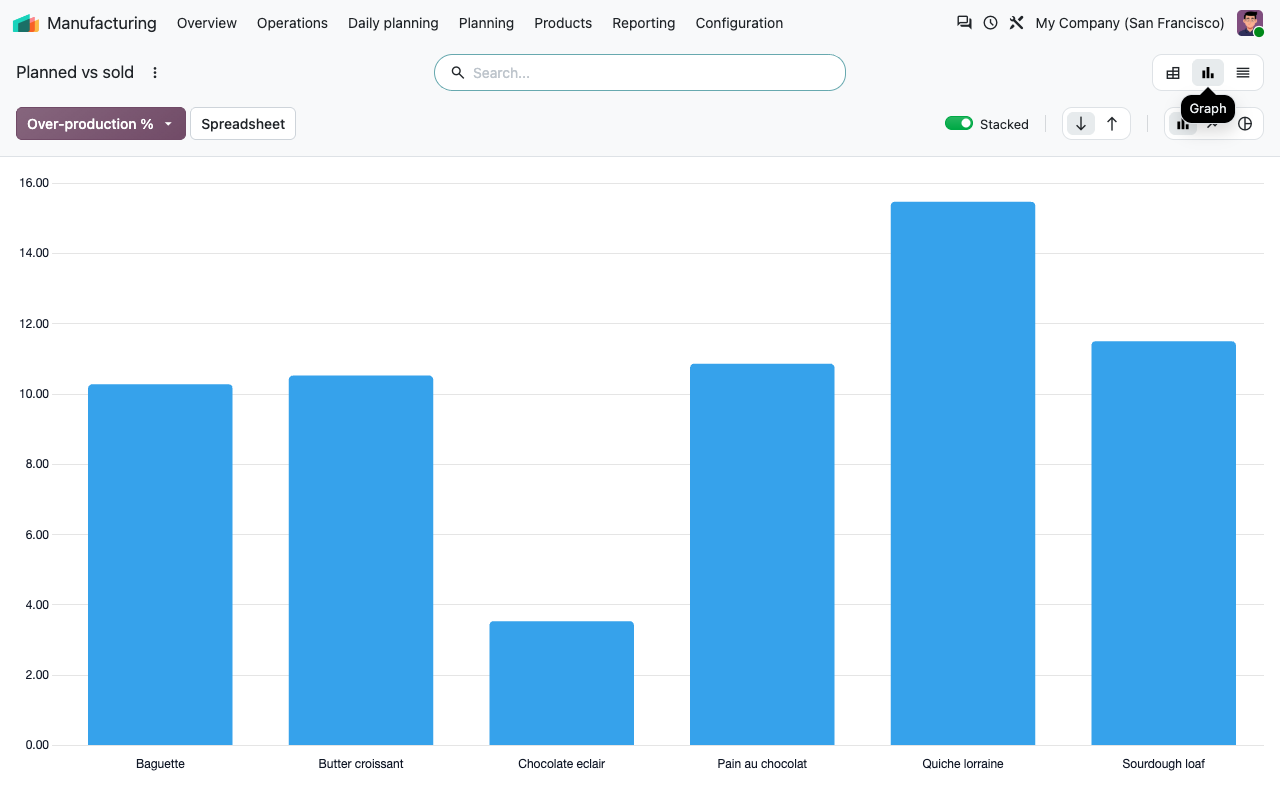
Manufacturing > Reporting > Planned vs sold compares, per product and per day, what you planned with what you sold (sales orders, plus the Point of Sale with the add-on). The over-production % tells you whether your safety margin is too high or too low. Sold quantities are collected every night for the last 7 days and when you mark a plan as done.
Planned, sold and over-production % per product
Average over-production % per product
Setup
Ready in ten minutes
1
Workshops
Manufacturing > Configuration > Workshops: create Bread, Pastry, Kitchen... and link your product categories.
2
Products
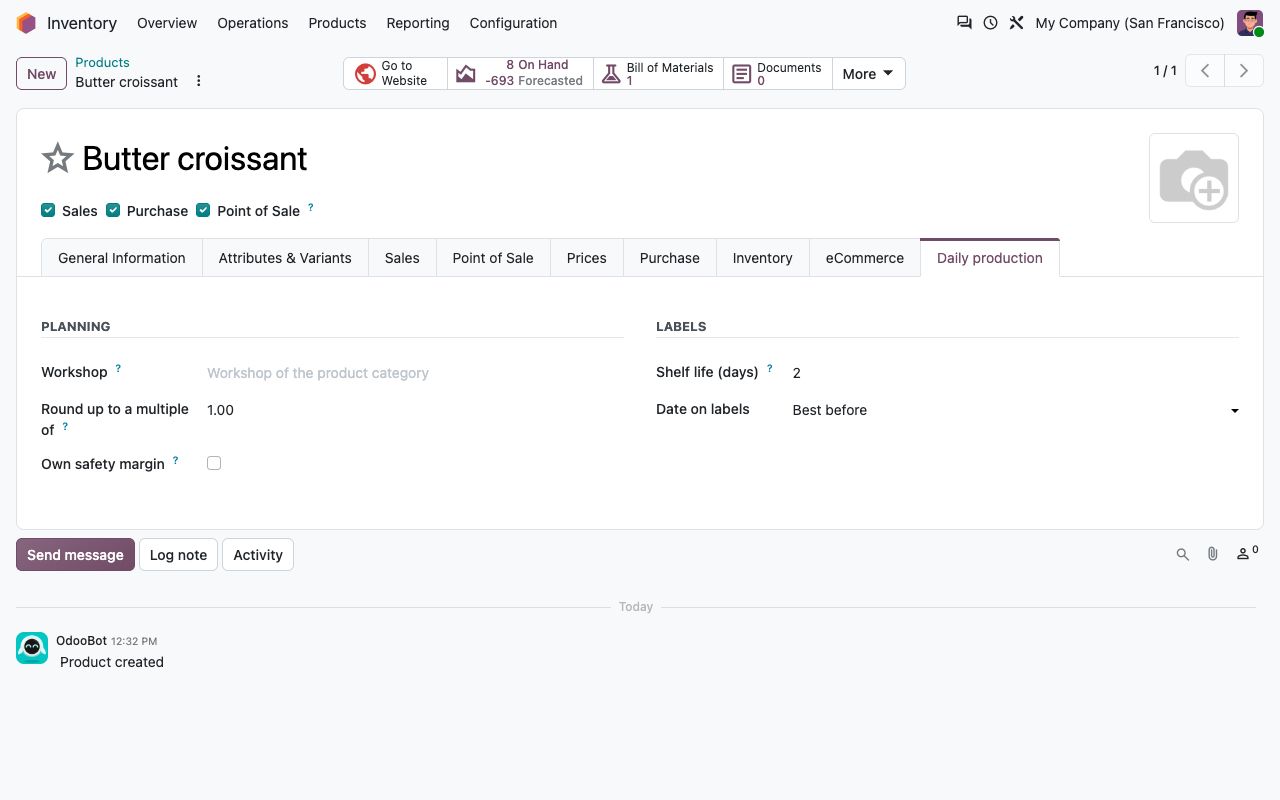
Give the products you make a bill of materials. In the Daily production tab, set the shelf life and the rounding.
3
Settings
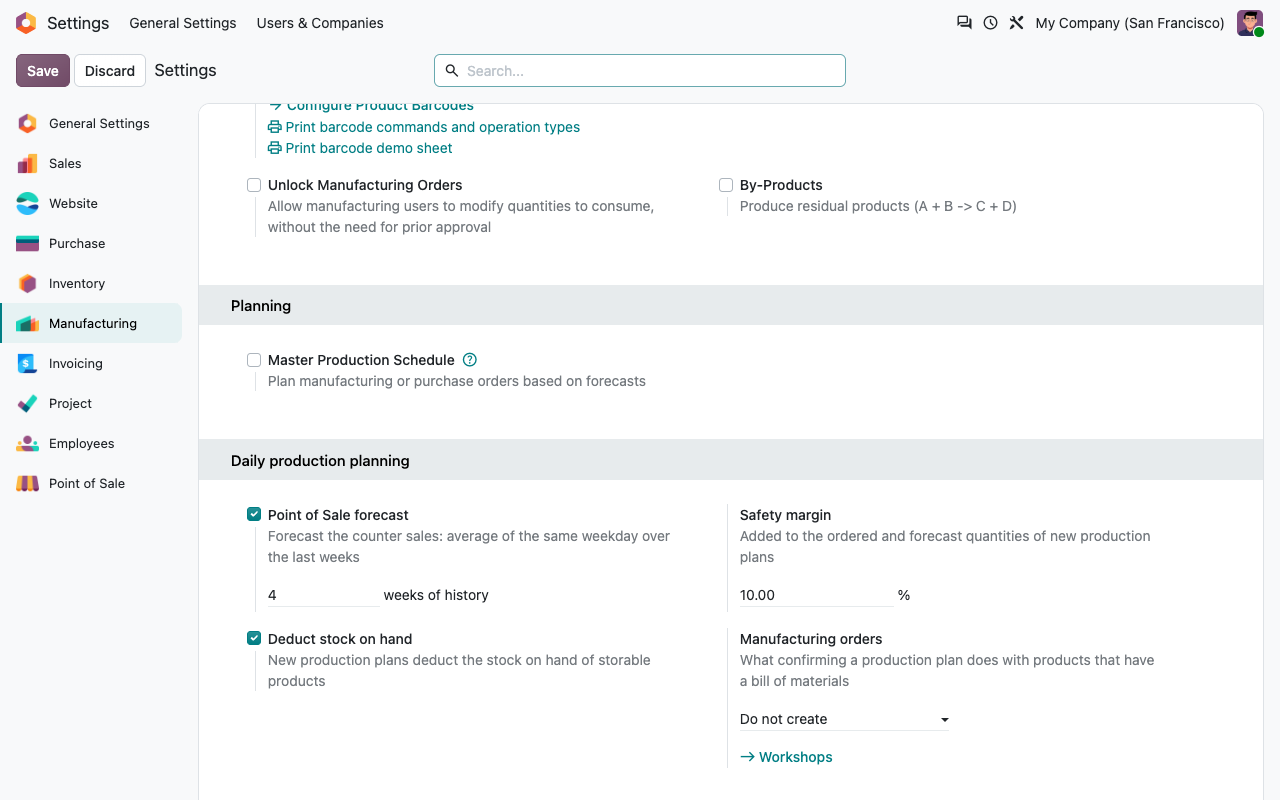
Manufacturing settings: safety margin, stock deduction, manufacturing orders and weeks of Point of Sale history.
4
Every evening
Daily planning > Production plans: create tomorrow's plan, Compute, adjust, Confirm and print.
Configuration
Workshops and products
A workshop with its categories and products
Daily production tab of a product
Under the hood
How it works
FAQ
Good to know
Can I get one manufacturing order per workshop?
An Odoo manufacturing order makes one product. The app creates one per product and puts the workshop on it, so you can filter and group the manufacturing orders by workshop.
Does it order or reserve my ingredients?
No. It lists what is required and what is missing; you order it as usual. Confirmed manufacturing orders reserve their components like any other.
What about products sold as kits?
A product with a kit bill of materials is not split into its components in the plan. Kits used inside a recipe are exploded in the ingredients.
When is a forecast missing?
Without the Point of Sale add-on, or when the shops sold nothing on that weekday during the period.
Does the safety margin apply to my extras?
No: only to the orders and the forecast. A product can have its own margin.
Which languages?
English and French (also used for fr_BE).
A question? A problem? Talk to the people who built it.
We will get back to you within 8 business hours.

Email us directly at
Published by
Nalios — Odoo Gold Partner, Belgium — nalios.be