White paper: Boost your emails: more engagement, less effort
Sending a campaign is easy. Knowing which one produced an appointment, and allowing a salesperson to call the right person at the right time, is another matter. This is what email marketing changes when it lives in the same tool as your clients.
Download the guideAsk your guide for
Free
Boostez vos emails : plus d'engagement, moins d'efforts !
Ask your guide for
Free
Boost your email impact : more engagement, less effort !
Ask your guide for
Free
Increase the impact of your email:
more engagement less effort !
With our guide, find out how to boost your emails!
Dive into this guide and learn how an email marketing webinar can transform your digital strategy. A key reading to understand the keys to impactful communication and boost your business growth.

What you will learn from this guide:
Target based on criteria you already know: country, language, role, products purchased, date of the last order, stage of the pipeline.
Subject, structure, length, and especially reusable templates. An email redone from scratch for each send is an email that does not go out.
The central chapter: how a click becomes an opportunity, and how a salesperson knows what marketing has sent before picking up the phone.
What opens and clicks really say, and the two indicators that truly matter for an SME.
How to compare two versions of a send, what to test as a priority, and from what volume it becomes useful.
The technical settings to make before the first send, and the rules to maintain over time.
To be reviewed in our webinar on email marketing
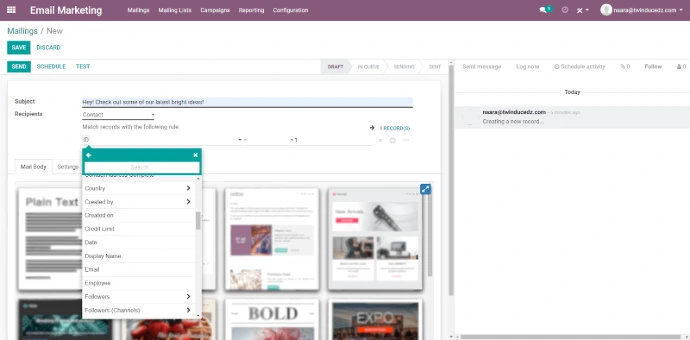
We took a concrete case of an SME and we rolled it out live in Odoo: building a list from the customer database, preparing an email, sending it, measuring what happens next, and turning reactions into concrete work for the sales team.
Who it is for: a manager or marketing manager of an SME who is already using Odoo, or who is considering bringing their campaigns from a separate tool.
Why do your emails in Odoo rather than elsewhere
Your usual emailing tool works on a list. Odoo works on your customer database.
The difference seems insignificant, yet it changes everything. You are no longer targeting a list imported last month; you are targeting your customers and prospects as they exist today, with the criteria you know: the country, the language, the role, the stage of the pipeline, the products already purchased, the date of the last order. A customer who orders next week automatically exits your reactivation campaign, without anyone having to think about it.
No more exports, no more imports, no more lists aging in a corner. And above all, no more duplicates between what your sales team thinks they know and what your marketing has sent.
From click to opportunity, the real issue
In a separate tool, an open and a click end up in a report that the salesperson does not read. In Odoo, they are attached to the contact, so they become commercial information.
Specifically, here is what we demonstrated live.
The salesperson sees what marketing has sent. Before calling, they know which campaigns this contact has received, which ones they have opened, and what they have clicked on. The difference between "hello, I am calling to present our solutions" and "hello, I saw that the topic of electronic invoicing interested you" is measured in appointment rates.
A behavior triggers an action, not just a simple report. A contact who opens the same email three times, or who clicks on the pricing page, can automatically generate an activity for the concerned salesperson, or an opportunity in the pipeline. You no longer depend on someone who thinks to check the statistics.
Forms feed directly into the pipeline. A guide download or a sign-up creates or enriches a lead, with its origin preserved. This is what makes the next step possible.
And you finally know what your marketing brings in. The origin is preserved from the first click to the invoice. You therefore answer the question that every management asks and that few SMEs can resolve: which actions have actually generated revenue, and which have just produced openings.
The commercial counterpart of all this is detailed on our page CRM and sales.
Three scenarios extracted from the guide
A quote sent and unsigned after ten days triggers an email, then an activity for the salesperson if the contact has opened it. The difference with a manual follow-up is not the quality of the message, it's that it takes place.
Registrants and downloads arrive in the database with their origin. A short sequence, two or three emails, allows sorting those who are progressing from those who were simply curious, before engaging a salesperson.
The setup to do before your first send
Before sending anything, your domain must be configured to allow Odoo to send on your behalf, and to sign your messages. Without these settings, your campaigns go to spam, and your quotes and invoices do too, which is much more serious.
Two pieces of advice that we apply systematically. Use a subdomain dedicated to mass sending, so that a poorly received campaign does not damage the reputation of the domain that carries your business exchanges. And gradually increase volume rather than sending thousands of messages on the first day from an address that email providers do not recognize.
It's a job of a few hours, and it is done before the first campaign, never after.
What Odoo will not do for you
Let’s be clear: if your business is large-scale content marketing, with very branched scenarios, ongoing tests, and landing pages optimized to the exact percentage, a specialized tool has the advantage and connects to Odoo.
Odoo wins when marketing serves commerce: a single database, reliable follow-ups, and business attribution. This is the case for the vast majority of SMEs that we support.
The complete overview of Odoo's marketing tools is on our page marketing tools.
Want to talk about it with someone who configures these campaigns every week?
We frame your first scenarios with you, and we handle the technical part before your first send.
Start now Discover our approach as an Odoo integrator